
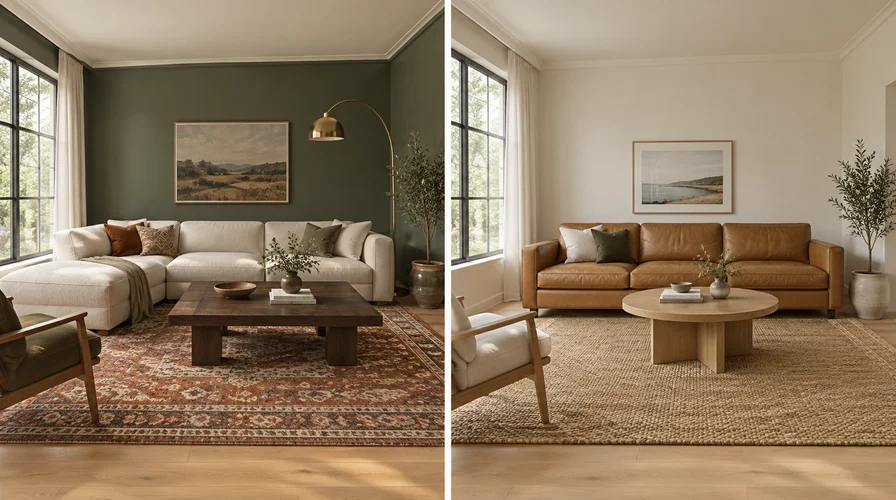
An interior design visualizer restyles your whole room. It changes the walls, the palette and the furniture, and the furniture it shows is generated rather than a product you can order. An AI furniture preview such as DecorViz leaves your room alone and tests one real product you already found in a store, from any retailer.
Both take a photo of your room as the starting point. That is why one search brings back both. They answer different questions.
Key points
- No product picked out yet? You want a room redesign.
- Product page already open? You want DecorViz.
- Furniture in a restyle is generated. There is no listing behind it.
- DecorViz takes a product image from any store, so nothing is catalog locked.
- DecorViz builds the preview from the real listing photo, so you judge the actual product.
What does an interior design visualizer actually do?
It takes your room photo and hands back a restyled version of the same room. New wall color, new palette, new furniture, sometimes a new layout.
The furniture in that result is invented by the model so the picture looks finished.
Style and color move together
Walls, textiles and wood tones all change at once. You are judging a direction, not an item.
The furniture is generated
It is not a chair or sofa pulled from a retailer as that exact product. It is the model's own interpretation of one.
There is no listing behind it
No price, no dimensions, no store page. Nothing you can add to a cart.
It works best early
Strongest before you have shortlisted anything, when you still need to know what look you are chasing.
RoomGPT is one widely used example of this approach.
What does an AI furniture preview do instead?
It keeps your room and tests one real product in it. In DecorViz you supply two images, and nothing else about the room changes.
Upload your room photo
The walls, floor, light and layout stay recognizable, because that is the room you are judging against.
Upload the product image
A listing photo or a screenshot of the exact item you are considering. Any store, any brand, because DecorViz has no catalog to be limited by.
Generate the preview
The product is placed into the scene with matched lighting and perspective, so it reads as part of the room.
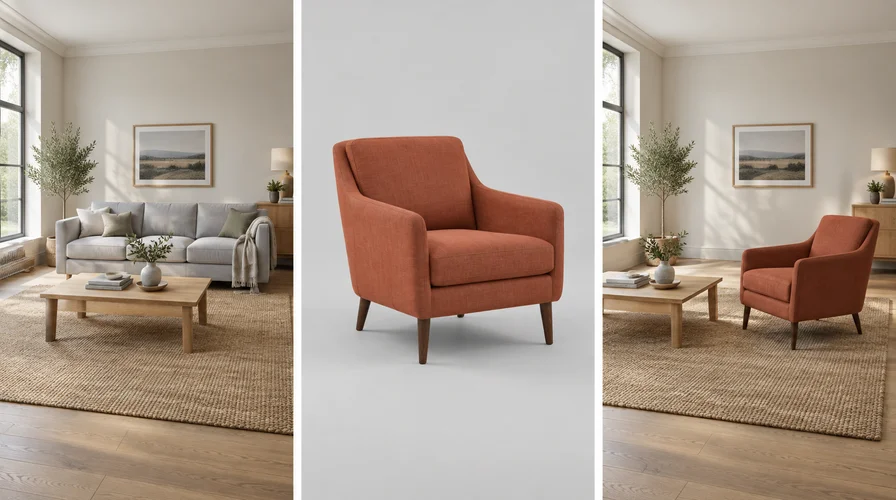 Your room
The product
The preview
Your room
The product
The preview
Two inputs, one result. Nothing in the room changes except the product being tested.
DecorViz is this path. It removes existing furniture in the target area and matches lighting and perspective, so you see the swap rather than two sofas stacked on each other.
You are looking at the actual product from the listing, standing in your actual room. For the click-by-click version, read how to place furniture in a room using AI.
Interior design visualizer vs AI furniture preview, side by side
The inputs look similar. The results are not interchangeable.
| Interior design visualizer | AI furniture preview (DecorViz) | |
|---|---|---|
| Your question | What could this room look like? | Does this item work here? |
| What you upload | Room photo, plus a style direction | Room photo and one product image |
| What changes | Style, color and furniture | One product. The room stays. |
| The furniture shown | Generated by the model | The product from your image |
| Stores you can pull from | None, the furniture is invented | Any store, any brand |
| What you leave with | A direction | A yes or a no on one item |
| Wrong use | Confirming something you can buy | Reinventing the whole room |
| Known example | RoomGPT | DecorViz |
Which one do I need right now?
Find the question you are actually asking today.
What should this room look like?
You have no product picked out and want options for mood, color and layout.
Room redesign
Room photo plus a style direction
Will this exact sofa work in here?
A product page is open and you need the rest of the room to stay put.
DecorViz
Room photo plus one product image
Which of these two listings is better here?
You are weighing two real products against each other in one space.
DecorViz, twice
Same room photo, one product swapped
The piece I want is from a shop nobody supports
No app, no 3D model, just a listing photo on a website.
DecorViz
A product image is all it needs
Can I buy the furniture in an AI room design?
No. The pieces in a restyled room are generated to complete the picture. There is no listing behind them, so there is nothing to search for and nothing to order.
The most common way people lose a weekend
They fall for a sofa in a render, then spend two days reverse image searching a piece that was never manufactured. Save the qualities you liked, not the object.
I like the style. How do I turn it into a purchase?
Keep the direction, then go find real products that match it.
Write down what you liked
Seat height, wood tone, wall color, how much pattern. Not the sofa. The qualities.
Shop against that list
Find real products matching those qualities at stores you would actually buy from.
Save one clean product image per finalist
Full outline visible, correct color and finish, nothing overlapping the item.
Preview each one in DecorViz, in the same room photo
Do not restyle the room between options, or you are no longer comparing products.
Check the listing before you order
Delivery, assembly and the returns window, the same as any furniture you buy online.
What does each picture actually settle?
One gives you a direction. The other gives you an answer about a product you can buy.
A restyle settles a direction
Useful for mood, palette and layout. The furniture in it was invented by the model, so there is nothing to order.
DecorViz settles the product
It builds the preview from the listing photo you supply, so you are judging that exact piece in its own finish, not a lookalike.
And it settles the room
Your walls, your floor and your light, with the piece currently in that spot taken out, so you see the swap and not a pile-up.
The listing handles the rest
Lead time, assembly and the returns window live on the product page, the same as any furniture you order online.
Frequently Asked Questions
Is an interior design visualizer the same as seeing one product in my room?
No. An interior design visualizer restyles the room, changing walls, palette and furniture together. Seeing one product keeps your room as it is and tests a single item you supplied from a listing.
I want to visualize interior design. Where should I start?
Start with a room redesign tool if you have no product picked out yet. It gives you a direction: warmer walls, lower seating, less pattern.
Treat the furniture in the result as fictional, because it is generated rather than pulled from a store.
Can AI furniture design show me a sofa I can buy?
Not when the furniture is generated. In a restyle the model invents pieces so the scene looks complete, so there is no listing behind them. To test something real, put the product image into DecorViz, which accepts a listing photo from any store and places it in your own room.
Does DecorViz redesign the whole room?
No. DecorViz tests one product in the room you already have. You upload a room photo and a product image. It is not a whole-room style generator, so it is the wrong tool while you are still exploring a look.
Does DecorViz show the real product or an approximation?
The real product. DecorViz builds the preview from the product image you supply, so the piece you see is the one on the listing, in its own finish.
That is the difference from a room redesign tool, which invents furniture to fill the scene.
Can I use one tool for both jobs?
Not in the same picture. A restyle has to change the room, and a product check needs the room held still. Run them in order instead: find a direction first, then test the real product against your actual room.
Already have a product image?
Upload your room photo and that product image to see the two together.
If you would rather start from a list of tools, see the best tools to see furniture in your room. For how photo previews compare with phone-camera AR, read AI vs AR for furniture preview. Shopping more than one retailer, read how to see Wayfair or IKEA furniture in your room.