Photograph the real space
Start with your actual living room, bedroom, office, or other space rather than a generic template.

Use DecorViz in Safari today while the native iPhone app is prepared. Preview a specific furniture product in your actual room before buying.
No native iOS interface or App Store screenshots are being presented before the app is ready.
The planned native app follows the same focused DecorViz workflow already available through Safari.
Start with your actual living room, bedroom, office, or other space rather than a generic template.
Use the image of the product you are considering from almost any retailer.
Compare products in context and reduce visual uncertainty before checkout or delivery.
Until the native iOS app launches, Safari provides access to the current DecorViz workspace.
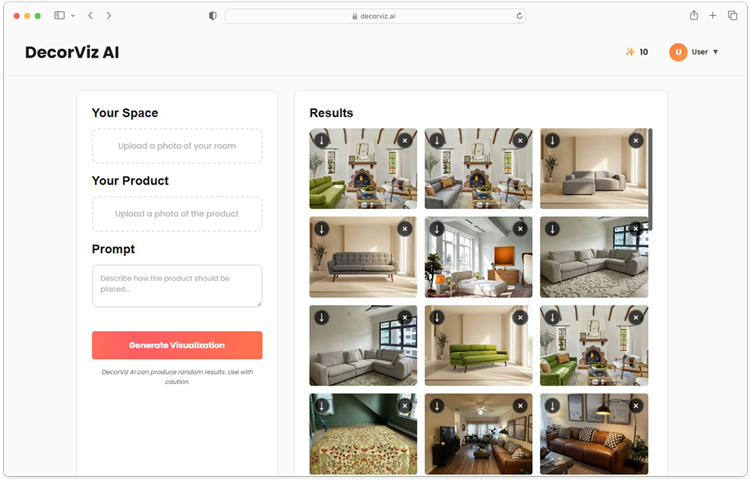
Available now in Safari
Upload the room photo and product image, add placement
direction, and review generated results in the web app.
This is the current Web App interface, not a preview of the future native iOS interface.
The iPhone camera and Photos library handle the two inputs DecorViz needs better than most other devices.
iPhone cameras produce detailed, well-exposed room photos that work well for generating realistic previews. No separate camera or transfer step needed.
Screenshot a sofa, rug, or table from any shopping app or mobile website and upload it straight from your Photos library without switching devices.
Download a generated result and share it with a partner, housemate, or family member before committing to a purchase.
Use DecorViz in Safari today. There is no installation step while the native iOS app is being prepared.
Use your iPhone to photograph the room and collect product images, then open the web app on a Mac or iPad to review and compare results in more detail.
Browse furniture on any iOS shopping app, screenshot the products you like, and test each one in DecorViz without leaving your Safari session.
Use photos already on your iPhone to test a product before ordering it.

Use your actual room
Choose a clear photo from your camera roll.
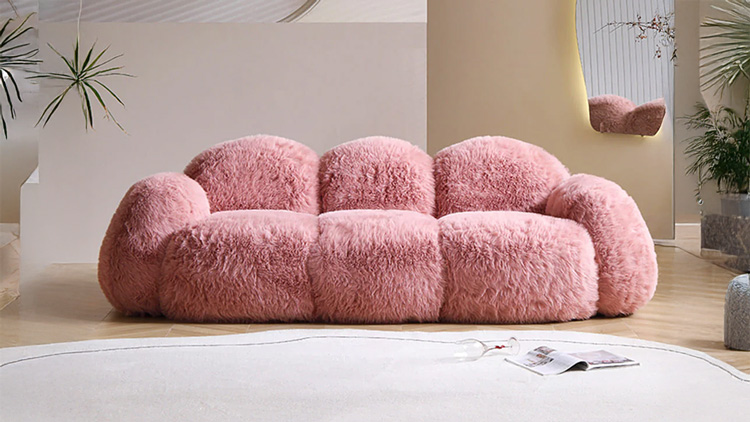
Test the exact product
Use the furniture image from the retailer you are considering.

Review before buying
Use the preview to compare the product with the room you already
have.
Open the current web app in Safari and follow the same simple room-photo and product-image workflow.

Select a clear image from Photos.
Upload the product you want to test.

Describe where the product should appear and compare the result.
AR apps on iPhone overlay a 3D model through the camera. DecorViz uses a real room photo and a specific product image to create a reusable preview you can revisit, share, and compare.
This approach works with products from almost any retailer, not just those with AR models. Read the complete AR furniture apps vs realistic room visualization guide.
Choose the currently available platform that suits your furniture shopping process.
Use DecorViz in Safari or another supported browser today.
The native Android furniture visualizer app is currently available on Google Play.
Compare current platform availability and choose the right way to use DecorViz.
Open the web app in Safari while the native iOS app is prepared. Free to start.
Open Web AppNot yet. The native DecorViz iOS app is coming soon.
Yes. You can use the DecorViz web app in Safari while the native iOS app is being prepared.
The planned iOS experience is focused on the same DecorViz workflow: combining a room photo and a product image to preview specific furniture before buying.
An exact release date has not been announced. Use the DecorViz web app in Safari while the native version is in development.
A native iOS app will offer tighter integration with the iPhone camera, Photos library, and share sheet compared to the current web app in Safari. The core visualizer workflow will be the same: upload a room photo and product image to preview furniture before buying.
Check the DecorViz apps page for availability updates when the native iOS app launches.
A native DecorViz iOS app is coming soon. iPhone users can use the DecorViz web app in Safari today to preview specific furniture products in a real room photo before buying.
Open the DecorViz web app in Safari on your iPhone. Upload a room photo and a product image to generate a preview of that specific furniture in your actual space.
The DecorViz web app is free to start and works in Safari on iPhone today. A native iOS app is in development and coming soon.