Add a Furniture Visualizer to Your Shopify Store
Add a "See in Your Room" option to your Shopify furniture product pages so shoppers can preview the product they are already considering in their own room. Install the app from the Shopify App Store, switch on the app embed, and every suitable product page is covered. No theme code to edit, and no 3D models to build.
Works from your existing product photos. Setup usually takes under five minutes. Shopper room photos stay private.
A visual next step on the Shopify product page
Shoppers open the widget from your product page, upload their room photo, and see the selected furniture in their own space. The product image is supplied automatically.
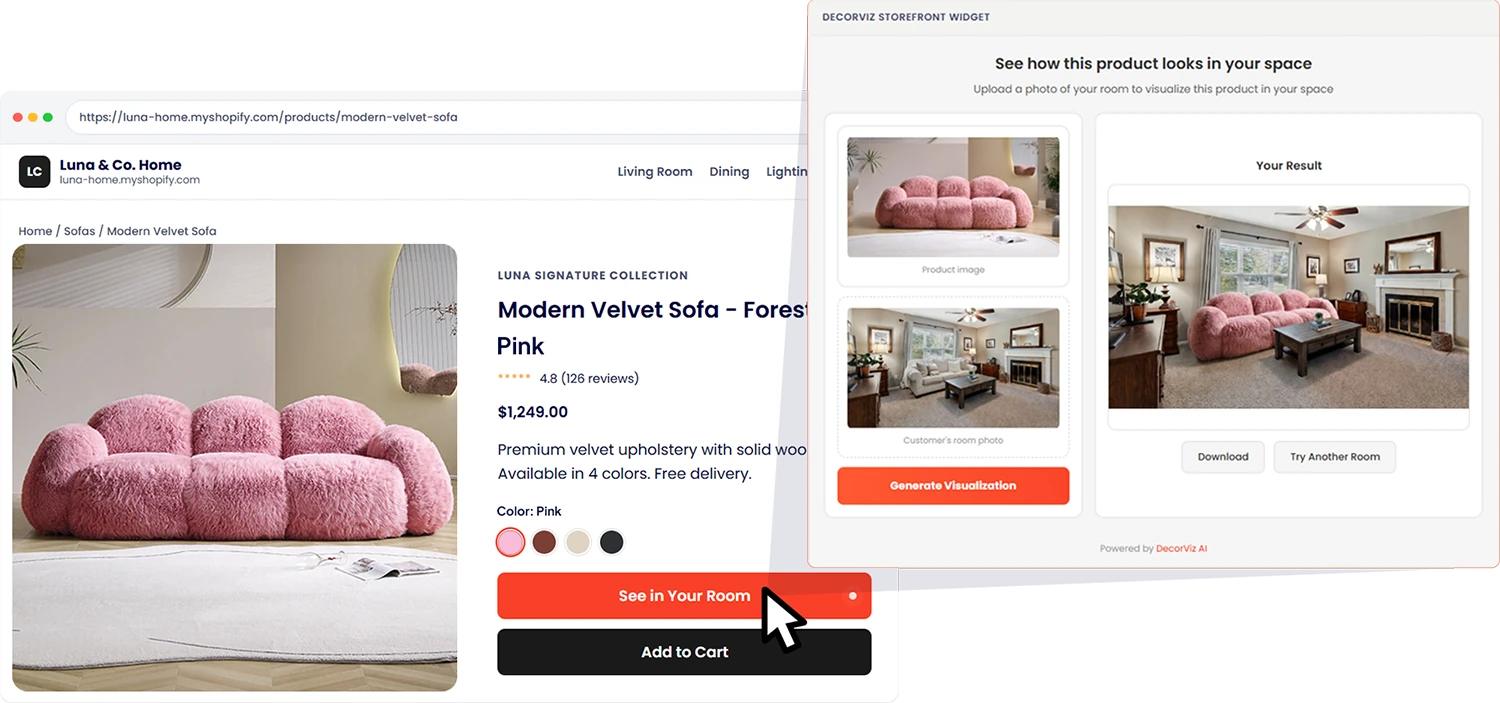
Previews help shoppers judge the look of a product in their room. Keep dimensions and clearance information in your product details. For a merchant example, read how Lyons Crafted uses Storefront.
How the Shopify shopper experience works
The shopper stays connected to the product they are considering throughout the preview.
Choose a product
The shopper opens a furniture product page and selects the Storefront room-preview button.

Upload a room photo
The shopper adds a private room photo without creating a separate DecorViz consumer account.
Review the product in context
DecorViz creates a visual reference using the product-page image and the shopper's room photo.
What this looks like inside Shopify
Three questions come up before any merchant adds something new to a live theme.
| Question | Answer |
|---|---|
| Is it a Shopify app? | Yes. DecorViz: Furniture Visualizer is listed on the Shopify App Store. It requests read access to products and collections to build the exclusion list, without writing to your catalog or accessing customer and order records. Shopify also shares store-owner details; see the listing's Data access section. |
| Which themes does it work with? | Storefront uses a Shopify app embed. Shopify supports app embeds in Online Store 2.0 and vintage themes, but older or heavily customized themes may need a placement adjustment. Test the button on your live product pages, or contact us for help with your theme. |
| Will it slow the product page? | The script is lightweight and loads asynchronously, so it does not block your product page render. It adds the Storefront button without affecting existing page load speed or theme performance. |
One thing to plan for: app embeds are stored per theme. If you publish a different theme, open its theme editor and switch DecorViz Storefront on there once. The app's Dashboard reminds you if it is off.
How to add DecorViz Storefront to Shopify in three steps
Install the app, switch on the app embed from the app's Dashboard, and the Preview button appears on suitable product pages. There is no key to copy.
- Install the app from the Shopify App Store and open it in your Shopify admin.
- Switch on the app embed. On the app's Dashboard, select Open theme editor, switch on DecorViz Storefront under App embeds, and save. There is nothing to copy.
- Test on your live store. Open a product page and generate a preview. Check a few product templates and a page on mobile.
Use the app's Settings to match the button to your theme, and Products to exclude items. The setup guide covers placement, billing, and troubleshooting.
What Storefront costs on Shopify
Billed through Shopify alongside the rest of your store. Your shoppers never pay DecorViz and never see a paywall.
Free
Where every new install starts. Test the Preview button on your own products before deciding anything.
- ✓ 5 free previews
- ✓ Preview button live on your store
- ✓ Full button and placement settings
Storefront 250
A starting plan for stores introducing room previews to their shoppers.
- ✓ 250 previews per month
- ✓ Every suitable product page covered
- ✓ Product and category exclusions
- ✓ Priority support, 24h response
Storefront 500
For higher-traffic catalogs, or once 250 previews stop lasting the month.
- ✓ 500 previews per month
- ✓ Everything in Storefront 250
- ✓ Move up from 250 at any time
| How the billing works | What that means |
|---|---|
| One preview, one credit | A preview is counted when a shopper generates one. Browsing the product page and opening the widget cost nothing. |
| What happens when previews run out | If the monthly allowance is used up, the Preview button stays visible and shoppers see a temporary-unavailability message rather than a result. They are never told the store has run out. The app warns you at three previews left. |
| Changing plans | Upgrades start immediately and add a full new allowance on top of whatever you have left. Downgrades take effect at the end of the billing period. The first-month price applies once, to your first subscription. |
| Already subscribed on decorviz.ai | Install the app with the same email you registered with and it runs on your existing Storefront plan. The app shows a "Billed on decorviz.ai" note rather than asking you to pay again through Shopify. |
| No per-product asset cost | No 3D modeling bill, no photography reshoot, and no per-SKU setup fee. Storefront works from the product images already on your pages. |
Photo-based visualization and 3D serve different needs
Choose the workflow that matches the decision your shoppers need to make.
DecorViz Storefront
- Starts with existing product photography
- Uses a still shopper room photo
- Supports visual context for the selected product
- Installs from the Shopify App Store
- Does not promise exact measurements
3D or AR workflow
- Usually starts with prepared 3D assets
- May use a live camera or room scan
- Can support rotation and configuration
- Setup scope depends on catalog size
- Measurement capabilities depend on the platform
Compare seven furniture visualization tools for retailers if you are still deciding between categories.
Shopify furniture visualizer FAQ
Yes. DecorViz: Furniture Visualizer is on the Shopify App Store. Install it, then switch on the DecorViz Storefront app embed from the app's Dashboard. There is nothing to copy or paste. Shoppers use the Preview button from the product page without downloading anything either.
It is a room visualiser for physical home products. Storefront works for furniture and home decor with a clear product photo, including sofas, tables, chairs, rugs, lighting, and wall decor.
Use a clear, well-lit photo where the item is easy to identify. Storefront reads the main product image from the page, so check that it loads normally for shoppers. Test a few products with variants or custom galleries before rolling out.
No. The script is lightweight and loads asynchronously, so it does not block your product page render or affect existing theme performance.
App embeds are stored per theme, so a newly published theme starts with DecorViz Storefront switched off. The app's Dashboard warns you and links to the new theme's editor: switch it on there and the button returns across the store. Your button settings and product exclusions are unaffected.
Usually not. Shopify supports app embeds in Online Store 2.0 and vintage themes, but older or heavily customized themes may need a placement adjustment. Test Storefront on your live product pages before rolling it out. If you cannot find the App embeds section in your theme editor, email [email protected] with your shop domain and we will take a look.
No. Storefront detects the product image displayed on the current product page. Once the app embed is on, every suitable product page is covered with no per-SKU configuration. Use the app's Products page only if you want to hide the button on a few specific items.
Every install starts on the Free plan with 5 free previews. After that it is $119 per month for 250 previews, or $199 per month for 500, billed through Shopify alongside the rest of your store and cancellable from your Shopify admin. Shopper previews draw from that monthly allowance. Your shoppers never pay DecorViz and never need a DecorViz account.
No. Storefront is one product with two surfaces, and the plan covers both. Install the Shopify app using the same email you registered with on DecorViz, and it recognises your existing Storefront plan and runs on it. The app shows a "Billed on decorviz.ai" note instead of asking you to subscribe through Shopify, and previews come out of the allowance you already pay for.
No. Storefront supports visual comparison, not exact measurement. Keep dimensions and clearance information visible in the Shopify product details.
No. Customer room photos are private and are not exposed to merchants.
Yes. Storefront supports automatic placement and configurable selectors for themes that require a specific button location.
Next steps for Shopify merchants
DecorViz Storefront
The full product overview, including platforms beyond Shopify.
Shopify App Setup Guide
The three-step install, the Dashboard, button settings, billing, and Shopify troubleshooting.
Lyons Crafted Case Study
A furniture merchant that replaced an AR viewer with photo-based previews.
Retailer Tool Comparison
Seven furniture visualization platforms compared by the job each one does.
Add "See in Your Room" to your Shopify store
Use the product photography you already have to give furniture shoppers a clearer visual decision. One app embed, every suitable product page.