Capture the room
Photograph the space where you want to add or replace furniture, or choose an existing room photo.

See a specific furniture product in your room before buying. Take or upload photos and review the visual decision from your Android device.
Keep the furniture decision close while you photograph your room, collect product images, and compare previews.
Photograph the space where you want to add or replace furniture, or choose an existing room photo.
Use a clear product image from almost any retailer instead of choosing from a closed catalog.
Generate a preview, compare alternatives, and make a more confident visual decision before spending money.
These screenshots come from the live DecorViz Google Play listing and show the current product promise.
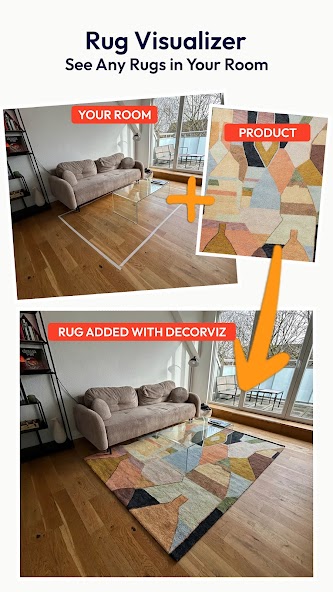
Rug visualizer
Compare a real rug product with the floor, sofa, and colors already in
your room.
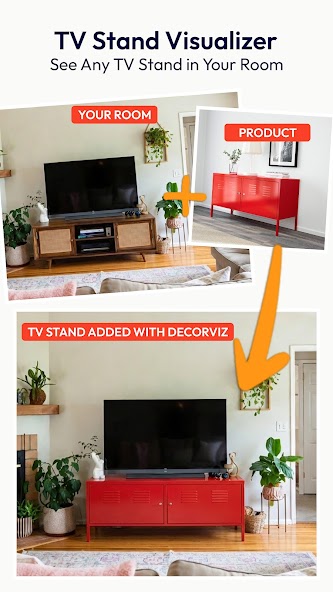
TV stand visualizer
Preview a replacement product before ordering or removing the
current piece.
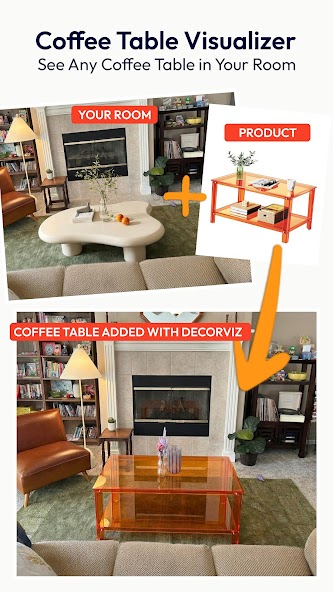
Coffee table visualizer
Judge how a table works with the seating area and room
layout.
Official Google Play listing screenshots. Last checked June 7, 2026.
Download DecorViz, upload the two images, and compare the generated preview before buying.

Take a new photo or choose a clear image already on your device.
Upload the exact furniture item you want to test.

Describe the intended placement and compare the result before buying.
The live Google Play listing provides current availability and data-safety information.
DecorViz: Furniture Visualizer is listed in the House & Home category as a free download with in-app purchases.
Google Play states that data is encrypted in transit and that the developer declares no data sharing with third parties.
The Google Play listing states that users can request data deletion.
Data-safety statements summarize the developer disclosure shown on the live Google Play listing. Last checked June 7, 2026.
DecorViz uses saved room and product photos to create a reusable preview instead of placing a live 3D model over the camera view.
This makes DecorViz useful for cross-retailer comparison and for sharing or revisiting the result later. Read the complete AR furniture apps vs realistic room visualization guide.
Generated previews are not locked to your phone. Switch to the web app when you want to review results on a larger screen or continue research from a desktop.
Open the same visualizer in a desktop or laptop browser to inspect results in detail, manage your comparison gallery, and keep retailer tabs open alongside.
An iPhone app is in development. iPhone users can use the DecorViz web app in Safari today while the native version is prepared.
Compare current platform availability and choose the right way to use DecorViz for where you are in the shopping process.
Download DecorViz: Furniture Visualizer from Google Play. Free to start.
Yes. DecorViz: Furniture Visualizer is available on Google Play for Android devices.
It combines a room photo with a product image to create a realistic preview of that furniture item in the room.
No. DecorViz uses saved room and product photos to generate a reusable preview rather than placing a live AR model through the camera.
Yes. DecorViz generates previews using AI processing in the cloud, so an active internet connection is required.
The Android app works with sofas, rugs, TV stands, coffee tables, beds, dining tables, and most other home furniture products.
The app is available on Android devices including phones and tablets through Google Play.
DecorViz: Furniture Visualizer is a focused Android app for previewing specific real furniture products in a room photo before buying. It is available as a free download on Google Play.
Yes. The DecorViz Android app lets you photograph your room or use an existing photo, upload a product image from almost any retailer, and generate a realistic preview of that item in your space.
Yes. Download DecorViz from Google Play, add a room photo and a product image, and the app generates a preview showing that specific furniture in your actual space before you order.