
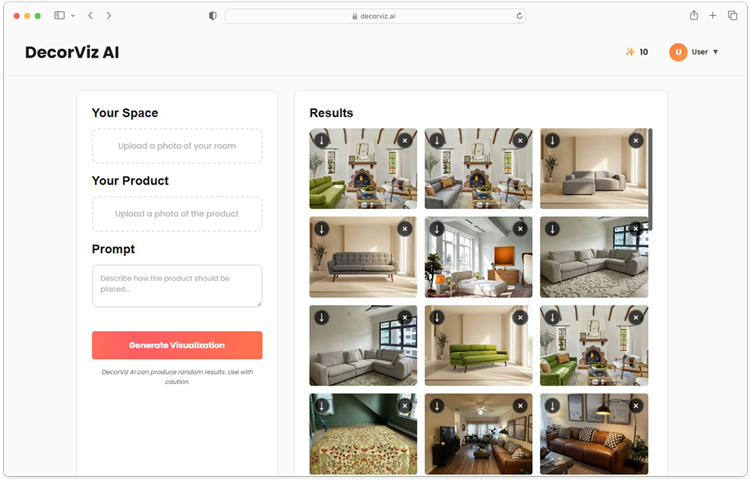
DecorViz Web App
Open the online furniture visualizer in a desktop or mobile browser. No app download is required.

See a specific furniture product in your actual room before buying. Choose the web app, Android app, or upcoming iOS app.
Use the same focused furniture visualization workflow on the platform that suits your shopping process.
Open the online furniture visualizer in a desktop or mobile browser. No app download is required.
Take room and product photos on your phone and keep furniture decisions close while you shop.
The native iPhone app is coming soon. Use the DecorViz web app in Safari today.
DecorViz stays focused on one buying decision: whether a specific real product looks right in your room.
Start with the real product image you are considering, not a generic 3D catalog item or broad design style.
Judge the product against your lighting, colors, flooring, and current furniture using a real room photo.
Compare products from different retailers and decide which item belongs in your space before checkout.
The app is designed around the full comparison loop, not just generating one image.
Upload a clean product image from a retailer page, screenshot, saved photo, or your camera.
Use the optional placement prompt to explain where or how the furniture should appear.
Keep the room viewpoint consistent while comparing different products, colors, or retailers.
Review generated images at a larger size and save the results that help the decision.
Open the Web App without installing native software and begin with your room and product photos.
Download the native Android app from Google Play when you want the visualizer close at hand.
The core visualizer is consistent, but each platform supports a different shopping moment.
| Platform | Best for | Availability | Why choose it |
|---|---|---|---|
| Web app | Researching and comparing products | Available now | Open retailer tabs, upload product images, and review a larger result gallery |
| Android app | Capturing rooms and comparing while shopping | Available on Google Play | Use the phone camera or photo library, then save useful previews to the device |
| iOS app | Future native iPhone workflow | Coming soon | Use the web app in Safari today while the native app is prepared |
Use DecorViz in a browser or on Android. The focused workflow only needs your room photo and product image.

Use a clear view of the space where the new product should appear.
Upload a clear furniture image from a retailer page, screenshot, or your camera.

Review the result alongside other product options before deciding what to buy.
Start in your browser now or download DecorViz for Android from Google Play.
DecorViz is an AI furniture visualizer that combines a room photo with a product image to show that specific item in your space.
DecorViz is currently available in a web browser and as an Android app on Google Play. An iOS app is coming soon.
No. DecorViz focuses on visualizing, adding, or swapping a specific furniture product in an existing room photo.
DecorViz is free to start. Credits are available by subscription or as one-time purchases for additional generations.
DecorViz works with sofas, rugs, beds, tables, TV stands, coffee tables, accent chairs, lamps, and most other home furniture products.
Yes. Upload product images from different stores and compare each option in the same room photo without switching apps.
Yes. DecorViz lets you upload a photo of your room and a product image to generate a realistic preview of that specific piece of furniture in your space. It is available in a browser and as an Android app.
Upload a clear photo of your room and the product image you are considering. DecorViz generates a realistic preview showing that specific item in your space so you can judge how it looks before ordering.
Yes. DecorViz uses your existing room photo and a product image from any retailer to show how that item looks in your actual space before you commit to a purchase.