
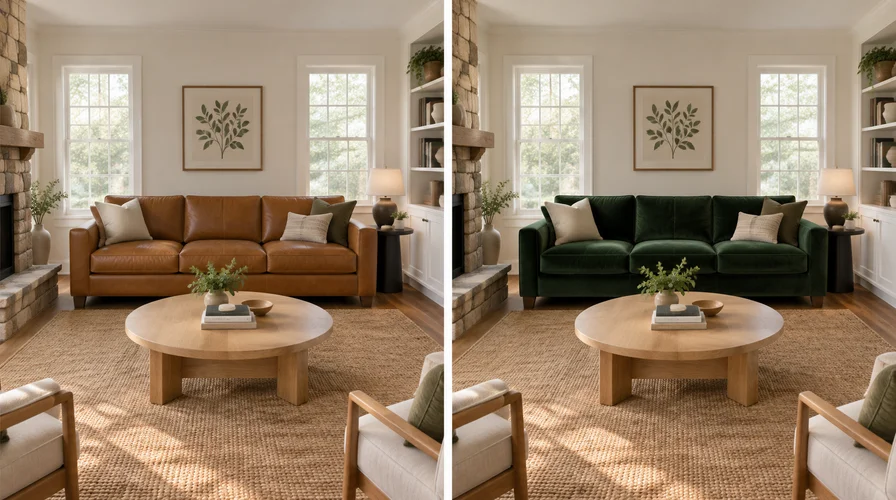
You have three options. Use Wayfair's own view in room feature for a Wayfair item while you are standing in the space. Use IKEA Kreativ when you are planning a room around IKEA products.
Use DecorViz when your shortlist crosses both stores. It works from a photo of your room and a product image from any listing, so no retailer catalog can limit what you preview.
The first two only work inside the store that built them. DecorViz is not tied to any catalog, so it can hold one room still while you swap in a Wayfair sofa, an IKEA sofa, or something from a shop neither of them has heard of.
Key points
- Retailer tools only reach their own catalog.
- Shortlist inside one store? The native tool is enough.
- Shortlist across stores? DecorViz previews any brand from one room photo.
- A live overlay leaves the piece you already own visible underneath. DecorViz removes it.
How can I see furniture from Wayfair or IKEA in my actual room?
Three paths, each built for a different moment in the decision.
Wayfair's view in room feature
Wayfair shows supported catalog items in a live camera view, labelled View in Room 3D on the product pages that have it. Best when you are at home, on a Wayfair page, and want a quick sense of footprint.
IKEA Kreativ
IKEA's own visualization experience, built around IKEA products and IKEA room planning. Best when IKEA is the store you have already settled on.
DecorViz
Upload a photo of your room and a product image from any listing, from any store. DecorViz removes the piece you already own and places the new one with matched lighting and perspective. Best when the shortlist spans stores.
Pick the one that matches the job you have today, not the one that demos best.
Why do the retailer tools stop at one store?
Each retailer tool is built on that retailer's own product data. It can only show you what is in its own catalog, which is fine until your shortlist crosses a store boundary.
When is Wayfair's own view in room feature enough?
When every serious option is already on Wayfair and you are standing in the room.
Works well
- You are on the product page anyway, so there is no extra upload
- It is tied to the exact listing in front of you, with no ambiguity about the variant
- It gives a quick sense of footprint while you stand in the space
Where it stops
- Catalog locked. It cannot show an IKEA piece or anything from a third store
- Your old sofa stays visible underneath the overlay, which hides the swap
- Not every listing supports it, so check the product page rather than assuming
If the shortlist is Wayfair only, stop here. You do not need a third tool. For how DecorViz compares on Wayfair specifically, see the Wayfair furniture visualizer page.
When is IKEA Kreativ enough?
When IKEA is the retailer you have committed to, and you are planning the room rather than testing one item.
Works well
- Strong inside IKEA's world, covering products, layouts and room concepts together
- Better than a single-item overlay when you are arranging a whole space
- A fair starting point when IKEA is the main retailer
Where it stops
- Built for planning, not for shortlisting an image you found elsewhere
- It only covers one side of a this-or-that decision across two stores
- Features change, so check what IKEA currently offers for your product
Room planning and product testing are different jobs. That distinction is covered in interior design visualizer vs AI furniture preview. If you are replacing the IKEA Place app specifically, see IKEA Place alternatives.
When should I use a room photo and a product image?
When the decision has outgrown any single store, or when you need the piece you already own out of the picture.
This is the path DecorViz is built for. You upload a photo of your room and a product image from a Wayfair listing, an IKEA listing or anywhere else. It removes existing furniture in the target area and matches lighting and perspective, so you are looking at your room with one thing changed.
Works well
- Any store. A product image is a product image, so nothing is catalog locked
- The piece you already own is removed, so you judge the swap and not a pile of two sofas
- One room photo carries across every option, which is what makes a comparison fair
- You get a still you can save, revisit and send to whoever else has a vote
- No need to be at home. A photo of the room is enough
Where it stops
- You have to save a product image first, which the retailer tools do for you
- It is a still, not a live view you can walk around
- Delivery terms, assembly and returns still come off each retailer's own page
Test both options against the same room
One room photo, one product image, and the piece you already own taken out of the picture.
Which path fits my shortlist?
Find the row that describes today, then start there.
| The job you have today | Start here |
|---|---|
| I am in the room and the item is on Wayfair | Wayfair's view in room feature |
| I am planning a room around IKEA products | IKEA Kreativ |
| My shortlist has one Wayfair option and one IKEA option | DecorViz |
| I need the sofa I already own removed from the picture | DecorViz |
| I want a still I can send to someone tonight | DecorViz |
| I am not at home, but I have a photo of the room | DecorViz |
| The piece I want is from a shop with no preview tool at all | DecorViz |
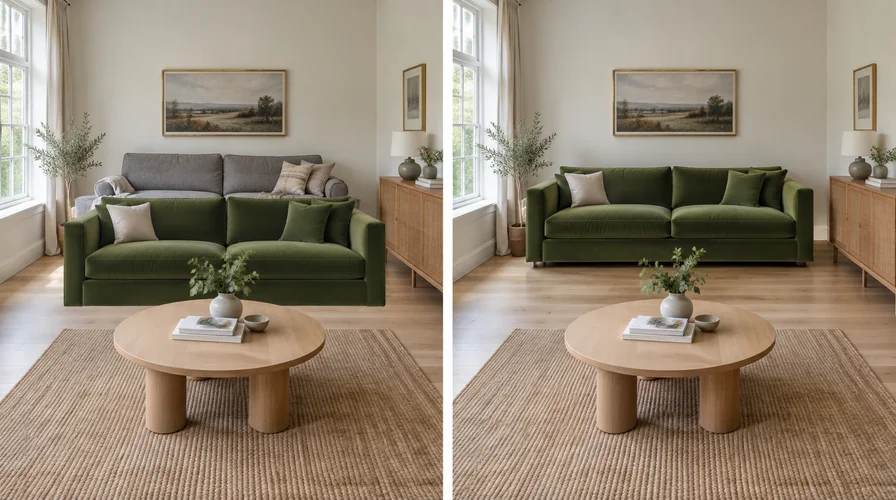 Live overlay: old sofa remains
Photo preview: old sofa replaced
Live overlay: old sofa remains
Photo preview: old sofa replaced
Left, a live overlay leaves the old piece underneath. Right, DecorViz replaces it.
For the longer method comparison, read AI vs AR for furniture preview and AR furniture apps vs realistic visualization.
How do I compare a Wayfair sofa and an IKEA sofa fairly?
Hold the room constant and change only the product. Comparing a Wayfair camera capture against an IKEA lifestyle photo mostly tells you which photographer had better light.
Write the decision in one line
Living room sofa, keeping the rug, Wayfair option A against IKEA option B.
Take one room photo
Straight on, daylight if you can, with enough floor and wall in frame to establish perspective.
Save one clean product image per option
Full outline visible, correct color and finish, nothing overlapping the item.
Run both through DecorViz against that same room photo
Same photo, same intended position, one product at a time, whichever store each came from.
Then open both listings
Check delivery, assembly and the returns window. Those differ between the two retailers.
Two previews is usually enough
If you are on your twentieth near-identical render, the picture is no longer the thing blocking the decision.
What does the preview settle before you order?
The part of the decision that a product page cannot answer on its own.
The look in your room
Your walls, your floor and your light, rather than a studio set that flatters everything equally.
The swap, not a pile-up
DecorViz takes the piece currently in that spot out of the picture. A live overlay leaves it sitting underneath.
The cross-store question
A Wayfair option and an IKEA option against one room photo, which is the comparison neither retailer tool can run.
What is left for the shop
Depth, firmness and back support stay showroom questions, and delivery terms differ between the two retailers.
Frequently Asked Questions
How can I see furniture from Wayfair or IKEA in my actual room?
Use Wayfair's view in room feature for supported Wayfair items while you are standing in the space. Use IKEA Kreativ when you are planning a room around IKEA products.
If you need to compare across both stores, or you need the piece you already own removed from the picture, use DecorViz. It works from a photo of your room and a product image from any retailer, so it is not limited to one catalog.
Can Wayfair's view in room feature show an IKEA product?
No. Retailer preview tools are built around that retailer's own catalog. For an IKEA piece, use IKEA's own tools, or use DecorViz, which accepts a product image from any store and places it in a photo of your room.
Is IKEA Kreativ the same as testing one product in my room?
Not quite. Kreativ is strongest for IKEA-centered room planning, where you are arranging a space around IKEA products. Testing one exact item in the room as it stands today is a narrower job.
What if my shortlist covers Wayfair, IKEA and a third store?
No retailer tool will give you one shared room across all three, because each is limited to its own catalog. Keep one room photo and preview each product image against it in DecorViz, which takes a listing photo from any of the three, so the room stays constant and only the product changes.
Why does the furniture I already own still show up in the preview?
Live camera overlays place a model on top of your view, so the existing piece stays underneath.
DecorViz removes furniture in the target area instead, which is the difference that matters when you are replacing something rather than adding to an empty corner.
Does DecorViz work with products from any store?
Yes. It works from a product image, not from a catalog, so a Wayfair listing, an IKEA listing, a small independent shop or a screenshot all work the same way.
That is what lets you put every option on your shortlist into the same room photo.
Shortlist crossing stores?
Upload one room photo and a product image from Wayfair, IKEA or anywhere else, then compare the options in the same room.
For a wider list of options, see the best tools to see furniture in your room. For the general method, read how to see furniture in your room before buying.