
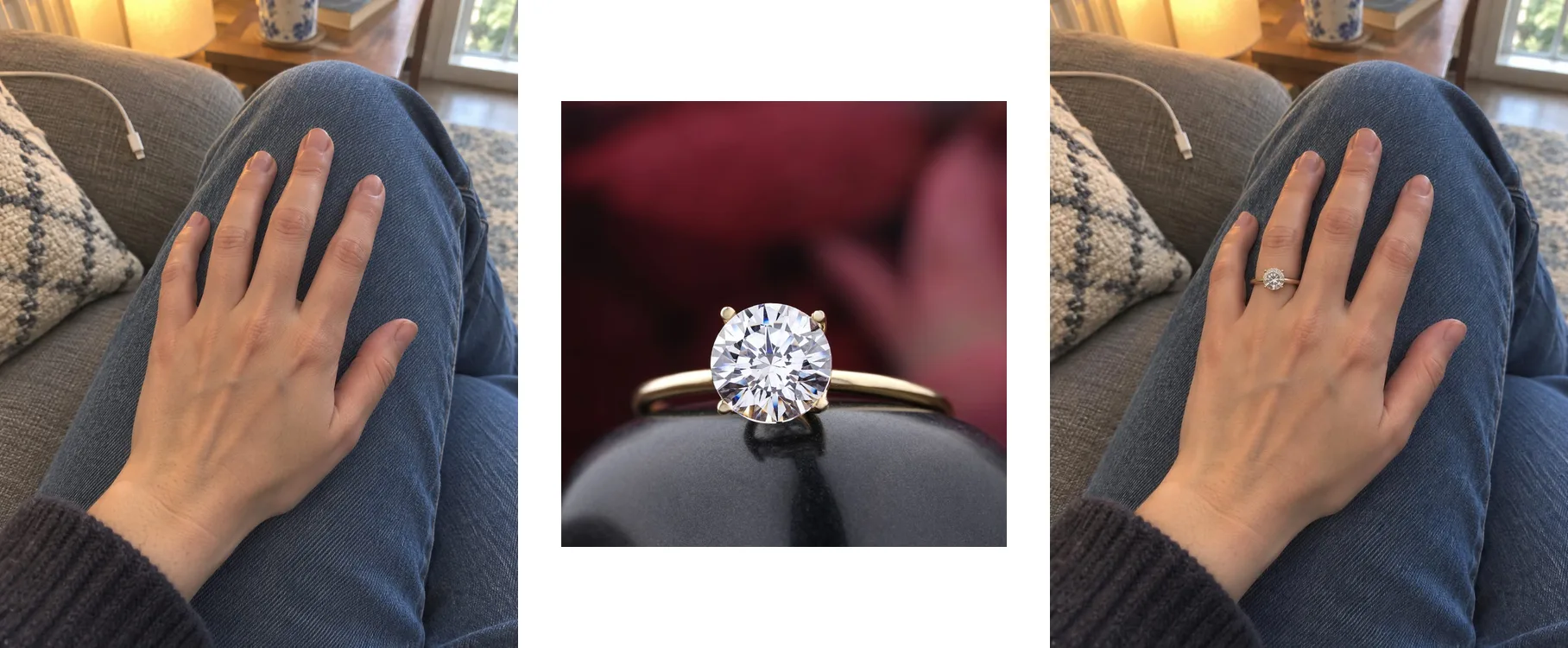
 One photo of you, one photo of the ring
JewelViz is a new product built by the team behind DecorViz. It is a virtual jewelry try-on: you upload a photo of yourself and a photo of a ring, necklace, earrings or bracelet, and JewelViz creates an image of you wearing the piece in about 20 seconds. JewelViz is live now at jewelviz.co.uk.
We built DecorViz to answer one question before people spend money on furniture: will this look right in my room? Jewelry shoppers ask the same kind of question every day, about themselves: will this look good on me? JewelViz is our answer to that one.
DecorViz shows furniture in your room. JewelViz shows jewelry on you.
Same team, same approach: your own photo, a real product photo, and a realistic image in your browser.
You cannot try on jewelry when you buy it online
In a shop, you slip the ring on and look. Online, you get a close-up of the piece on a velvet stand or on a model who is not you. So people guess, order, and hope. JewelViz replaces that guess with an image of the piece on you.
"Will it suit me?"
See the piece with your own skin tone, your style and the clothes you actually wear.
"Will she like it?"
Buying a gift? With the person's permission, see the piece on a photo of them first.
"Which one should I pick?"
Compare several pieces on the same photo and choose the one you keep coming back to.
How JewelViz works: your photo plus a jewelry photo
If you have used DecorViz, the JewelViz try-on will feel familiar. It takes three steps.
Add a photo of yourself
A clear, well-lit photo of the place where the jewelry will sit: your hand for a ring, your neck for a necklace, your ears for earrings or your wrist for a bracelet.
Add a photo of the piece
Any clear photo of the jewelry, from any store, website or saved picture. A photo on a plain background gives the best result.
Choose the type and see it on you
Pick the kind of jewelry, and JewelViz creates an image of you wearing it in about 20 seconds. The image is saved in your JewelViz account.
Your photo stays yours
JewelViz uses your photos only to make your images and does not keep the photos you upload. It does not use them to train AI models and does not sell them.
Try on rings, necklaces, earrings, bracelets and full sets
 Created with JewelViz
Necklace
Earrings
Bracelet
Set
Each image starts from an ordinary photo of the person and a photo of the piece.
JewelViz supports rings, engagement rings, wedding rings, necklaces, earrings, bracelets, necklace and earring sets, and full jewelry sets. It also works well for making photos of yourself wearing jewelry for Instagram and other social media.
See any jewelry on you before you buy it
Free to start, no card needed, nothing to download.
Why JewelViz is its own product, not a DecorViz feature
Furniture is placed in a room. Jewelry is worn. That one difference changes almost everything: the photo you start from, the types of products, the way the result has to look, and the people using it. So instead of adding jewelry to DecorViz, we built JewelViz as its own product, with its own website, app and Shopify app.
What carries over is everything that makes DecorViz work. The image is built from the real product photo, so it shows that exact piece, not a lookalike. It works with a photo from any store, not only one retailer's catalog. And it runs in the browser, with no AR app and no special camera.
JewelViz for jewelry stores: a try-on button on Shopify and any website
Just as DecorViz Storefront adds a See in Your Room button to furniture stores, JewelViz Storefront adds a Try this piece on button to a jewelry store's product pages. A shopper adds one photo and sees that exact piece on them, without leaving the store.
Shopify stores
Install JewelViz from the Shopify App Store and pay through Shopify.
WooCommerce, Wix, Squarespace and custom sites
Subscribe in the JewelViz app, copy the install script and paste it into your website.
Shopper privacy works the same way it does in DecorViz Storefront. Stores see how the button is used, never the shoppers' photos or the images made from them.
JewelViz FAQ
What is JewelViz?
JewelViz is a virtual jewelry try-on built by the team behind DecorViz. You upload a photo of yourself and a photo of a ring, necklace, earrings or bracelet, and JewelViz creates an image of you wearing the piece in about 20 seconds.
Is JewelViz made by DecorViz?
Yes. JewelViz is a separate product built by the DecorViz team. DecorViz shows furniture and decor in your room, and JewelViz shows jewelry on you. Each has its own website and app.
Can I try on jewelry with DecorViz?
Jewelry try-on lives in JewelViz, at jewelviz.co.uk. DecorViz stays focused on furniture and home decor in your own room photo.
Is JewelViz free to use?
JewelViz is free to start. A new account gets free generations with no card needed, and paid plans are listed on jewelviz.co.uk.
Can jewelry stores add JewelViz to their website?
Yes. JewelViz Storefront adds a Try this piece on button to a jewelry store's product pages. Shopify stores install the JewelViz app from the Shopify App Store, and WooCommerce, Wix, Squarespace and custom websites add it with one install script.
Do I need to download an app to use JewelViz?
No. JewelViz runs in your web browser on a phone or a computer.
Shopping for furniture instead? See any piece in your own room with the free DecorViz furniture visualizer. More announcements are in DecorViz News.