Furniture stores can reduce avoidable returns by improving product information, delivery guidance, and visual context before checkout. Room visualization is especially useful for mismatch-driven returns because it helps shoppers evaluate a product's color, style, and visual presence in their own space.
The goal is not to block returns
The goal is to reduce avoidable disappointment. Give shoppers the dimensions, material information, delivery details, and visual context they need before they place an order.
Start by Separating Return Types
A single return rate hides different problems. Before changing tools or policy, group returns by cause.
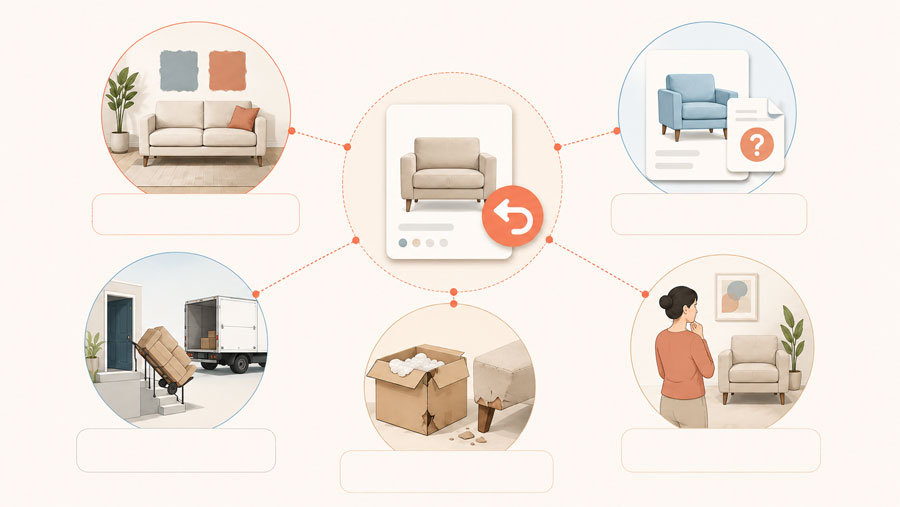
Mismatch-driven returns
The item looked different than expected: too dark, too bulky, wrong undertone, wrong style, or not right with existing furniture.
Information-gap returns
The shopper missed something knowable: delivery requirements, assembly, fabric care, finish variation, or room access.
Operational returns
Damage, wrong item, shipping issues, missing parts, late delivery, or warehouse errors. These need operational fixes, not product-page copy alone.
The first group needs more than a clearer return policy. Shoppers need a way to take the product out of the studio image and picture it beside their own floors, walls, light, and furniture. A room preview gives them that moment before the order is placed.
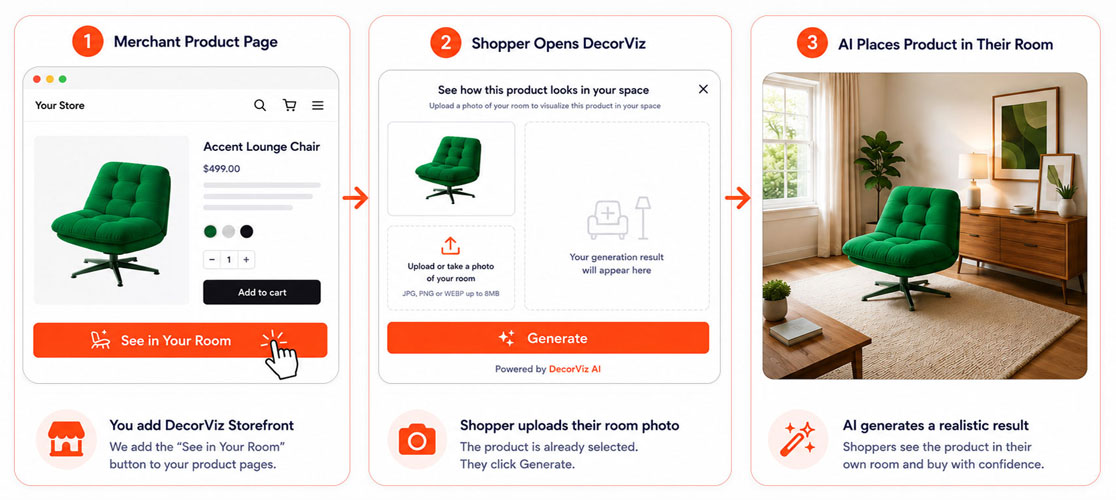
DecorViz Storefront is the retailer tool that brings this preview to the product page. It adds a "See in Your Room" option so shoppers can upload a photo of their space and see the product as part of the room they already know.
Why prevention deserves attention
The National Retail Federation projected $890 billion in total US retail returns for 2024. That is a retail-wide figure, not a furniture return-rate benchmark, but it shows why retailers are investing in better return capabilities. Read the NRF and Happy Returns report.
Show the Shopper the Product in Their Room Before It Becomes a Return
Furniture shopping is personal. A product can look beautiful in a styled catalog image and still feel uncertain when the shopper cannot picture it at home. Their room has its own light, floors, colors, and furniture. Until they see those details together, they are being asked to make an expensive decision from imagination alone.
Seeing the product in their own room changes the conversation. It turns a flat product image into a familiar scene: the sofa beside their existing chair, the rug against their floor, or the dining table in the space where people gather. Shoppers can feel more connected to the choice because they are no longer trying to mentally build the room around a catalog photo.
DecorViz Storefront brings that experience directly to the product page. It adds a "See in Your Room" option so shoppers can upload a photo of their space and see the product as part of the room they already know. A realistic room preview does not replace dimensions, delivery information, or a clear return policy. It answers the visual question those details cannot: can I picture living with this product in my own room?
What Lyons Crafted's founder reported
“We have definitely noticed an increase in our conversion rate, and customer engagement has also increased.”
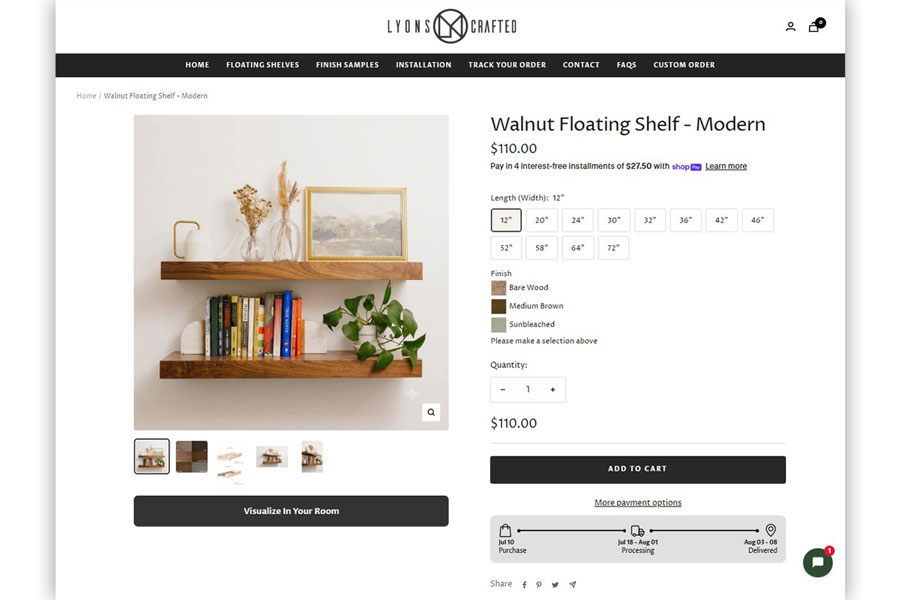
Andre Lemer, founder of Lyons Crafted, reported an approximately 30% month-over-month conversion-rate increase after adding its custom DecorViz Storefront button, "Visualise in Your Room." Lyons Crafted sells four wood types and multiple stain options, where a studio photo alone cannot show how a finish will read in a buyer's own setting. This is one merchant's reported result, not a guaranteed outcome. Month-over-month performance can also be influenced by traffic, seasonality, promotions, and other store changes.
Evaluating product visualization for your store? Read our guide to ecommerce product visualization for furniture retailers.
Fix Product Page Uncertainty First
The product page should answer the questions a shopper would ask in a showroom. Most return-prevention work is simply making those answers visible before checkout.
Baymard Institute's furniture and home decor usability testing found that 79% of participants interacted with the main product image or thumbnails as their first product-page action, compared with 46% in its general ecommerce testing. This makes visual information a practical part of product evaluation, not decoration. Review Baymard's furniture UX findings.
Show dimensions in context
Give full dimensions, seat height, clearance, depth, and packaging dimensions. Add plain-language notes like "best for apartments" or "deep lounge seat" when true.
Explain color and material variation
Tell shoppers when wood grain, fabric texture, screen color, natural light, or pile direction may change how the product appears.
Use real-room images
Studio images sell the product. Real-room images help shoppers understand visual presence, color, and styling context.
Answer delivery and access questions
For large pieces, include door, stair, elevator, assembly, and room-access guidance near the add-to-cart area.
Add Room Visualization to High-Uncertainty Products
A shopper can read dimensions and still not know whether a sofa will overwhelm the room, whether a rug color will clash with the floor, or whether a dining table will feel too visually heavy. Room visualization answers that visual question directly.
DecorViz Storefront makes that room preview part of the buying journey, directly from the furniture product page. Shoppers can move from considering a product to seeing it in the room they are furnishing before they commit to the purchase.
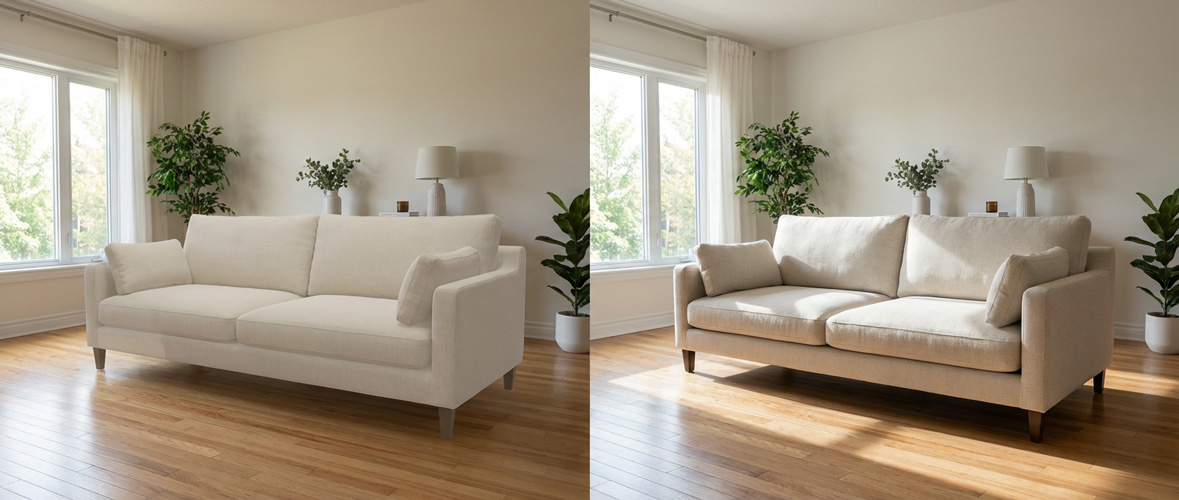
A photo-based preview does not replace measurements. It helps shoppers assess color, style, lighting, and visual weight in the room where the product will live.
AR and 3D viewers solve a related but different shopping task. If you are deciding which experience fits your catalog, compare AI furniture previews with AR and learn how AR furniture apps differ from realistic room visualization.
The shopper clicks "See in Your Room"
The button appears on the product page, near the normal buying flow.
They upload a room photo
No room scan, no app download, and no customer DecorViz account are required.
They see the product in context
The generated preview helps them evaluate color, style, visual weight, and room compatibility before they buy.
Let shoppers see the product in their own room
DecorViz Storefront adds a realistic room preview to your furniture product pages.
Set Clear Expectations Without Making the Store Feel Risky
Many retailers try to reduce returns by making the return policy stricter. That may reduce some returns, but it can also lower trust. A better first move is clearer expectation-setting.
Keep the policy readable
Use plain language for time windows, fees, original packaging, exclusions, custom items, and damage reporting.
Move key limits upstream
If a product is final sale, custom, oversized, or subject to return shipping fees, make that clear before checkout.
Offer decision support
For expensive items, invite shoppers to check measurements, preview in room, compare swatches, or contact support before ordering.
A 30-Day Return Reduction Plan
Week 1: Audit return reasons
Tag recent returns by cause, SKU, product category, and return cost. Separate mismatch, information gaps, damage, shipping, wrong item, and buyer remorse. Do not treat those as one problem.
Week 2: Fix top product pages
Start with the products that create the most return cost or pre-purchase hesitation. Add context images, clearer material notes, delivery guidance, and decision-focused FAQs near the buying controls.
Week 3: Add visualization to priority SKUs
Start with products where visual uncertainty is high: sofas, rugs, beds, dining tables, sectionals, curtains, chairs, and large statement pieces. Keep dimensions and access guidance visible alongside the preview.
Week 4: Measure hesitation and returns
Track preview use, add-to-cart rate, completed orders, support questions, and return reasons by product category. Compare the before-and-after trend, then keep improving the pages where expectation gaps remain.
| Measure | What it tells you | Decision to make next |
|---|---|---|
| Preview use by product category | Where shoppers need more confidence before buying | Prioritize similar high-interest products |
| Support questions before purchase | Which facts are still missing from the product page | Add clearer answers near the buying controls |
| Return reason and return cost | Whether mismatch is actually the issue | Improve the product page or fix the operational cause |
FAQ
How can furniture stores reduce returns before checkout?
Furniture stores can reduce returns before checkout by identifying mismatch-driven returns and resolving uncertainty before checkout. Clear product details, real-room context, delivery guidance, and room visualization can help shoppers make more confident decisions before ordering.
What causes furniture returns in ecommerce?
Common furniture-return causes include visual mismatch, unclear dimensions or material expectations, delivery and access problems, damage, and changed preferences. Product-page improvements address visual and information gaps, while delivery and quality issues need their own operational fixes.
Does room visualization reduce furniture returns?
Room visualization can reduce mismatch-driven furniture returns by helping shoppers see a specific product in their own room before checkout. It supports visual decisions about color, style, lighting, and presence. It does not prevent damage, delivery, or every preference-based return.
What tools help furniture retailers reduce returns?
Useful return-reduction tools include complete dimensions and material information, real-room product images, delivery and access guidance, and a product-page room preview. DecorViz Storefront adds a customizable room-preview button so shoppers can see the product in their room before buying.
For a guide to product-page visualization, read ecommerce product visualization for furniture retailers. To add room previews to your product pages, visit DecorViz Storefront.