Ecommerce product visualization helps furniture retailers show products in context before purchase. DecorViz Storefront adds a customizable "See in Your Room" experience to product pages using existing product photos, without requiring 3D models, a room scan, or a customer app.
The best tool solves the product-page question
For a furniture retailer, the highest-value visualization moment is often not a generic lifestyle image. It is the moment a shopper asks, "How will this product look in my room?" and can answer it without leaving the store website.
What Is Ecommerce Product Visualization for Furniture Retailers?
An ecommerce product visualization tool helps shoppers understand a product in context before they buy. Furniture retailers can use product images, lifestyle images, 3D viewers, AR, or photo-based room previews. Each approach solves a different part of the buying decision.
| Tool type | Best for | What it does not replace |
|---|---|---|
| Product-page room preview | Seeing a specific product in the shopper's own room before checkout | Dimensions, delivery guidance, and product facts |
| AR or 3D viewer | Interactive inspection, configurable products, and existing 3D catalogs | A naturally integrated room preview from a standard product photo |
| Lifestyle imagery | Merchandising and inspiration | The shopper's personal room context |
Why Product-Page Visualization Matters for Furniture Ecommerce
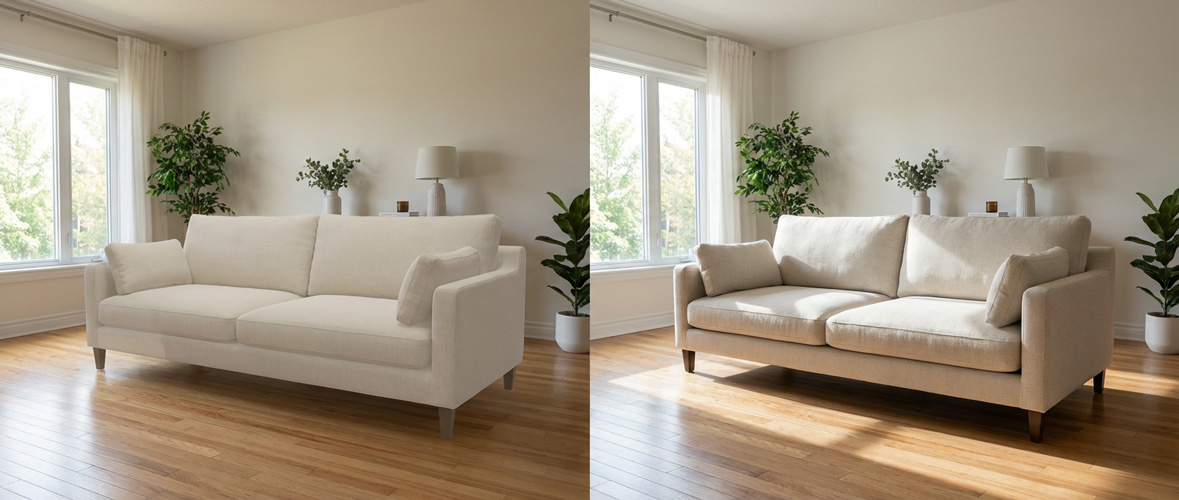
A studio product photo can explain the object, but it cannot show the floor, wall colors, light, and existing furniture in the shopper's home. That gap creates hesitation exactly when the shopper is close to adding a high-consideration item to the cart.
Keep the decision on your website
A product-page preview gives shoppers a useful next step instead of sending them away to imagine, search for inspiration, or postpone the purchase.
Make the product feel more personal
Seeing furniture against familiar surroundings helps a shopper connect the catalog product to the room they are actually furnishing.
Reduce avoidable mismatch
Visual context can surface color, style, lighting, and visual-presence concerns before delivery.
Add a Room Preview to Your Furniture Product Pages
DecorViz Storefront adds a customizable room-preview button to a retailer's product pages. The shopper uploads a room photo, then sees the current product in the space they know before committing to the purchase.
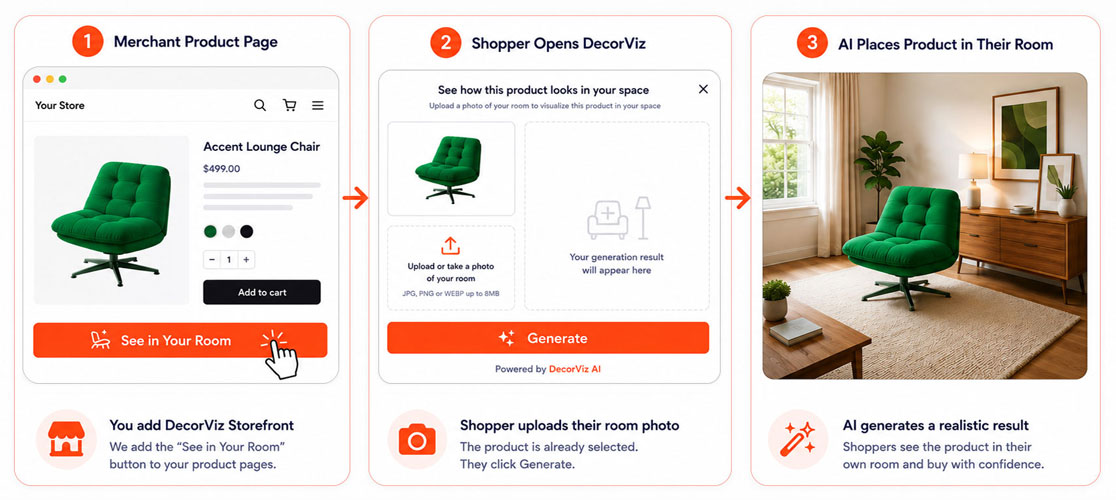
The shopper opens a product page
The normal product image, price, variants, and buying controls remain on the merchant website.
They choose the room-preview button
The button text, color, and style can match the merchant's website and buying flow.
They upload a room photo
No DecorViz account, app download, or customer payment is required.
They see the product in context
The preview helps them assess color, style, lighting, and visual presence before they buy.
Room previews in practice: Lyons Crafted
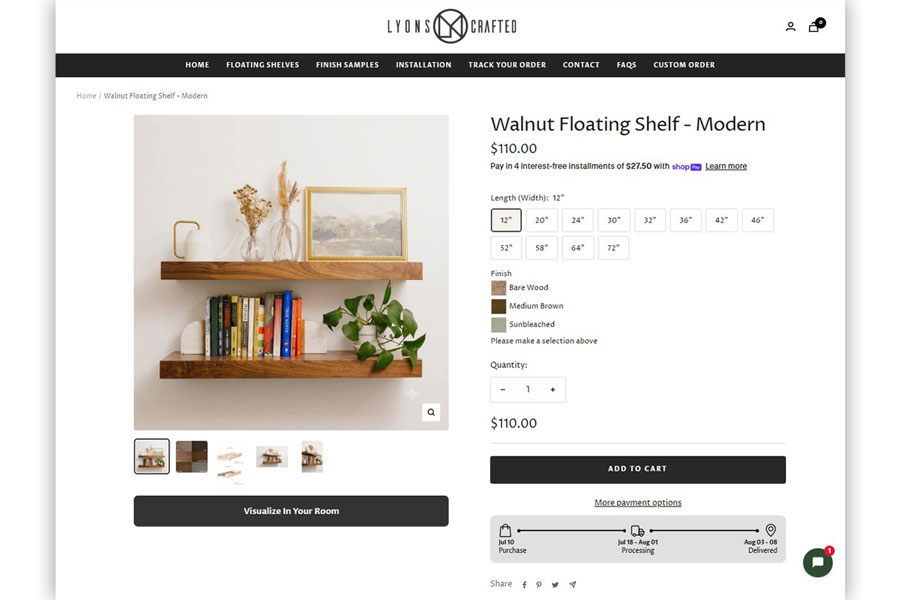
“Customer engagement has also increased”, sagt Andre Lemer, founder of Lyons Crafted, a woodworking store offering four wood types and multiple stain options.
After adding a custom DecorViz Storefront button labeled "Visualise in Your Room," Lyons Crafted saw an approximately 30% month-over-month lift in conversion rate. Studio photos alone could not show how a specific wood finish would read in a buyer's room. This is one merchant's reported experience; results vary with traffic, seasonality, and other store changes.
Give shoppers a visual next step before checkout
Add a customizable room-preview experience to your furniture product pages.
What Does Storefront Require From the Retailer and Shopper?
DecorViz Storefront is designed for retailers that want ecommerce room visualization without producing a separate 3D model for every product. It uses the product imagery already shown on the product page and a room photo supplied by the shopper.
| Decision factor | DecorViz Storefront approach |
|---|---|
| Supported websites | Shopify, WooCommerce, Wix, Squarespace, and custom-coded stores with theme or script access |
| Merchant setup | One lightweight script; most Shopify merchants can complete setup in one session |
| Product assets | Existing product photos; no separate 3D catalog is required |
| Shopper requirements | One room photo; no DecorViz account, room scan, app download, or payment to DecorViz |
| Room-photo privacy | Merchants cannot view, browse, or download individual shopper room photos |
| Merchant branding | Customizable button text, color, and styling for the existing product-page experience |
Review current plans on the DecorViz pricing page, then use the Storefront setup guide to see the installation steps.
What to Look for in a Product Visualization Tool
It works where the decision happens
For furniture ecommerce, prioritize an experience that lives on the product page, not a disconnected demo that asks shoppers to restart their journey.
It works with your current product images
A practical rollout should not require a separate 3D-production project for every furniture product before the tool can be useful.
It protects the shopper's privacy
Customer room images should stay private. Merchants need aggregated signals, not access to individual customer room photos.
It sets honest expectations
A room preview supports a visual decision. It should sit beside clear dimensions, material details, delivery guidance, and a readable return policy.
Should You Use AR, 3D, or Photo-Based Room Visualization?
AR and 3D viewers can be useful when a retailer has a 3D asset library, configurable products, or a need for interactive product inspection. Photo-based room visualization is useful when the question is more personal: how will this particular product look in the shopper's own room?
The right choice depends on the job. Read our comparisons of AI furniture previews and AR and AR furniture apps and realistic room visualization for a fuller breakdown.
Who DecorViz Storefront is best for
Choose Storefront when shoppers mainly need a believable view of a product in their own room and you want to use existing product photos. Choose a calibrated 3D or AR workflow when interactive configuration or measurement-led placement is the central requirement.
Start With the Products That Create the Most Hesitation
Begin with high-consideration products where a shopper benefits most from seeing the product in a familiar room.
Choose priority categories
Start with sofas, rugs, beds, dining tables, sectionals, chairs, and statement pieces.
Keep product facts nearby
Pair the preview with dimensions, material notes, delivery details, and answers to common questions.
Measure the decision
Track preview-button use, completed previews, add-to-cart behavior after preview, conversion by comparable visitor group, support questions, and return reasons by product category.
Treat the preview as visual decision support. It can help shoppers evaluate color, style, lighting, and visual presence, but it does not replace published dimensions, material samples, delivery checks, or room-access guidance.
FAQ
What is ecommerce product visualization for furniture retailers?
Ecommerce product visualization helps furniture retailers show products in context before purchase. A product-page room preview can let shoppers see the current product in their own room before they decide whether to buy.
What should furniture retailers look for in a product visualization tool?
Look for a tool that works with existing product photos, appears naturally on product pages, preserves customer privacy, offers customizable merchant branding, and sets honest expectations about what a visual preview can and cannot tell a shopper.
Do furniture stores need 3D models for product visualization?
Not always. AR and 3D viewers generally use 3D assets, while photo-based room visualization can use a product photo and a shopper's room photo to create a realistic preview.
Can product-page visualization help reduce furniture returns?
Product-page visualization can help reduce mismatch-driven returns by helping shoppers assess color, style, lighting, and visual presence before checkout. It does not prevent returns caused by damage, delivery issues, missed dimensions, or changed preferences.
For a return-focused playbook, read how furniture retailers reduce returns before checkout. To add room previews to your product pages, visit DecorViz Storefront.