See the bookshelf against the actual wall
Judge the bookcase against the wall, flooring, and desk visible in your home office photo rather than against a generic product background.
Upload a photo of your home office and any bookshelf or bookcase product image. Preview how the unit reads against the wall, beside the desk, and in the room before you order.
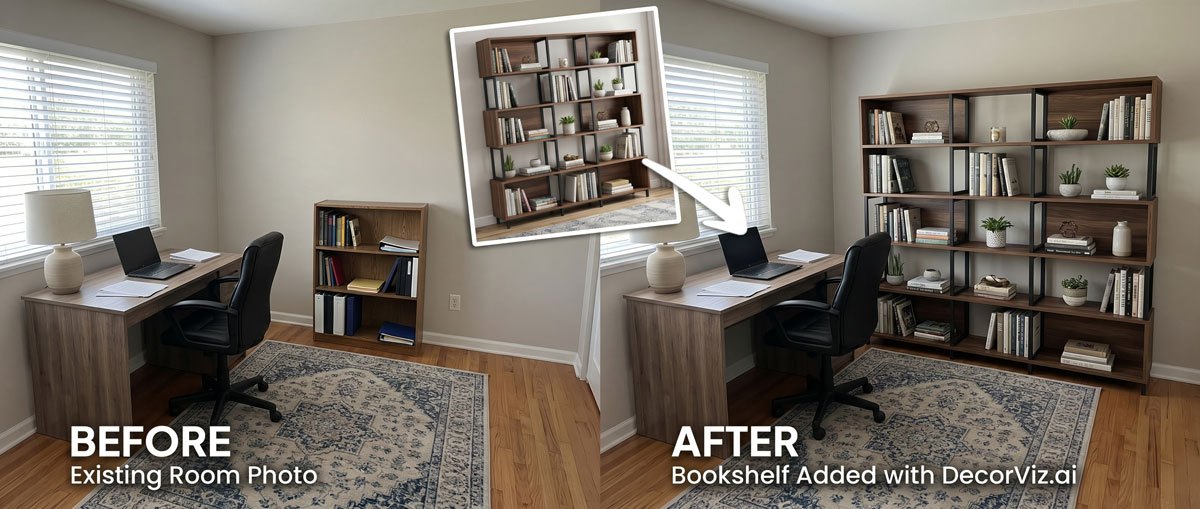
Use the same home office photo to preview a bookshelf, compare two different sizes, or replace existing shelving before ordering.
A home office bookshelf visualizer places a specific bookcase or shelving unit into your actual room photo. Instead of judging the piece from a product page, you can review it against your wall, with the desk, flooring, and the furniture that will remain in the room visible.
DecorViz works from a room photo and a product image. It does not require an AR room scan, a 3D model, or a retailer-specific catalog.
This page focuses on bookshelf visualization in a home office. For other office furniture, visit the Home Office Visualizer Hub. To preview any furniture category in any room, use the complete furniture visualizer.
A bookshelf defines the background of a home office. Its height, width, and finish affect how the entire room reads. Previewing the actual product shows whether it works before ordering.
Judge the bookcase against the wall, flooring, and desk visible in your home office photo rather than against a generic product background.
A floor-to-ceiling bookcase creates a different visual effect than a mid-height unit in the same room. Preview both from the same viewpoint.
Keep the old shelving visible in the room photo and preview the new product in the same wall position to judge the change directly.
Home office bookshelf decisions typically involve adding storage to a wall, replacing existing shelving, or deciding between open and closed storage options.
Keep the old unit visible in the room photo and preview the new product against the same wall to judge the visual change before committing.
"I want to see a tall walnut bookcase where my current one is."
Preview different bookcase styles and heights against the target wall to confirm one works with the desk and room before ordering.
"Which bookshelf fills this wall without overwhelming the room?"
Use the same home office photo with each style so the visual difference between open shelving and a closed bookcase is clear from a consistent viewpoint.
"Which reads better in my room: open shelves or a bookcase with doors?"
Storage changes the entire wall behind or beside a desk. A preview helps people judge the bookshelf as part of the working environment before confirming dimensions and capacity.
You need room for books, files, or equipment, but the shelving must still leave the workspace feeling open and usable.
You are specifying shelving that must relate to the desk, artwork, wall width, and the client's visible video-call background.
Your office may occupy a corner, alcove, or shared room. You want more storage without making the wall feel heavy or reducing visual breathing room.
Use the generated view as a visual decision aid, then confirm the retailer's dimensions and product details before ordering.
Check whether the bookcase reads as proportional to the available wall height, or whether it appears too tall or too short in the room.
Compare the bookshelf's wood tone or painted finish with the desk, walls, and flooring visible in the room.
See whether the bookshelf fills the wall appropriately or appears narrow and underfilled in the room context.
Preview both from the same viewpoint. Open shelves read as lighter and more casual beside a desk than a closed bookcase, and the preview shows which suits the room.
Each approach answers a different question. Use the one that matches what you actually need to decide.
| Approach | Shows bookshelf in your actual home office | Works with any retailer | Requires room scan or 3D model | Free to use |
|---|---|---|---|---|
| DecorViz (AI preview) | Yes, uses your actual room photo | Yes, any product image from any store | No, photo upload only | Free to start |
| AR apps | Yes, through phone camera | No, limited to the retailer's catalog | Usually uses camera tracking, a compatible device, and retailer-provided 3D product assets | Varies by app |
| Showroom visit | No, staged room not your room | Limited to that showroom's stock | No scan needed | No, travel and time cost |
| Product photo only | No, isolated background | Yes, any product page | No | Yes |
A showroom visit helps you assess shelf depth, build quality, and weight capacity. DecorViz helps you assess visual fit in your actual room. Use both when the purchase is significant.
Storage furniture occupies a large part of the wall. A preview helps reveal when the height, width, finish, or openness works against the office rather than supporting it.
A dark or wide unit near the ceiling can make a compact office feel compressed even when it physically fits the wall.
Two large pieces with unrelated finishes or equally strong visual weight can make the workstation feel fragmented.
A fully open bookcase may look light when empty but visually busy once it becomes the background for work and video calls.
A narrow bookshelf on a broad wall can appear accidental, while an oversized one can crowd doorways, windows, or desk clearance.
Use DecorViz to compare the visual effect of the bookshelf, then verify wall clearances, anchoring requirements, and storage specifications.
Use the preview to choose the visual direction. Use measurements and installation details to confirm the bookshelf is safe and suitable.
Compare storage options against the same wall while keeping the desk and room context unchanged.
A product image shows the shelving unit, but not how much of your wall it occupies or how visually heavy it feels.
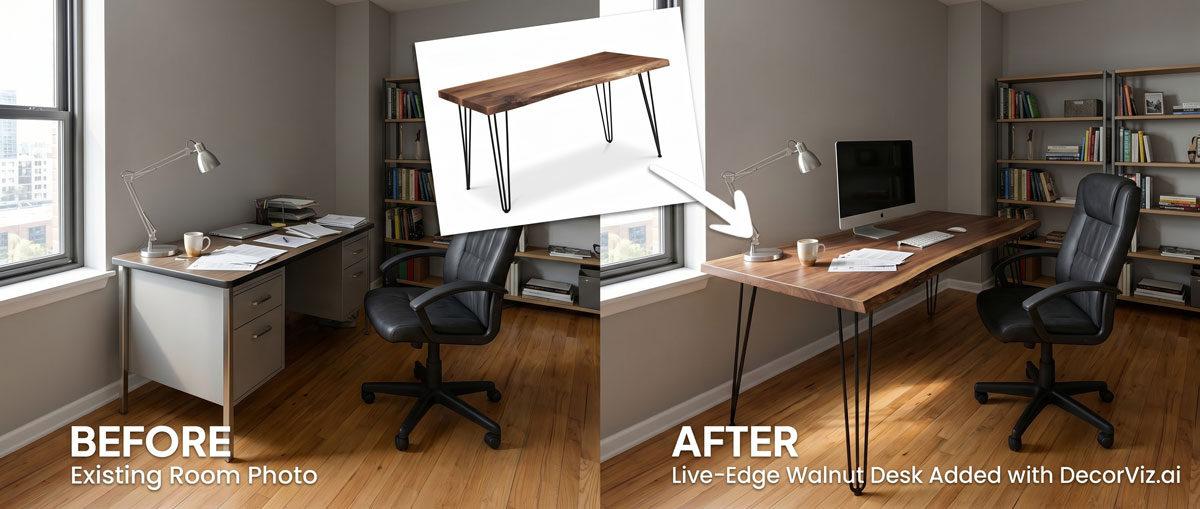
Keep the desk visible so you can judge whether the storage complements or competes with the main workstation.
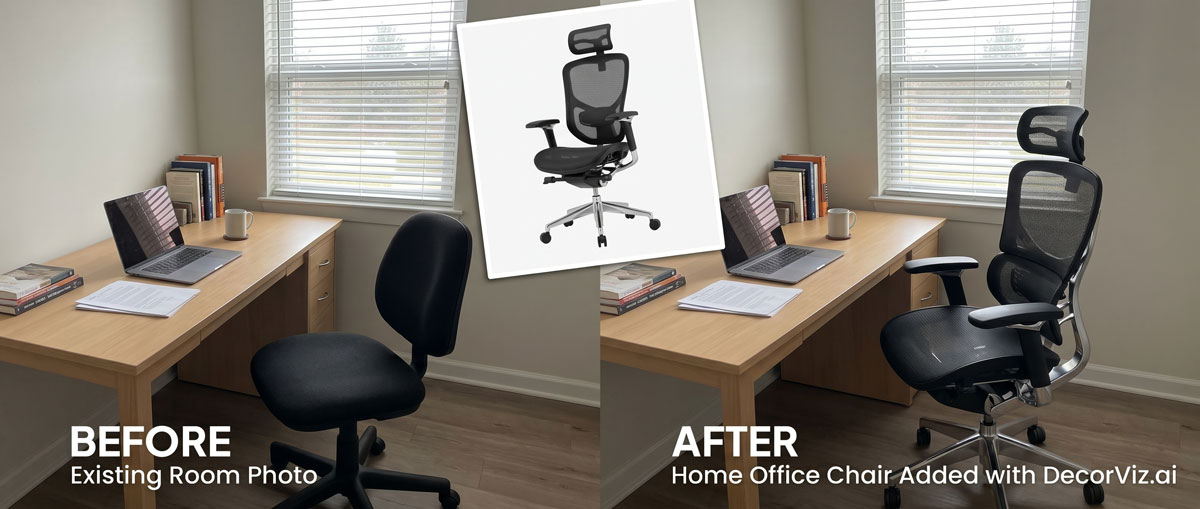
Test tall, low, open, and closed units from one viewpoint while the room palette and circulation context remain consistent.
Use DecorViz in a browser or the Android app. No AR room scan or 3D product model is required.

Use a photo showing the wall where the bookshelf will go and as much of the room as possible including the desk.
Upload a clear image of the exact bookshelf or bookcase you are considering from any retailer.

See the bookshelf against the wall and beside the desk. Compare a different size, finish, or style using the same room photo.
A bookshelf decision often depends on what shares the room with it. Preview connected pieces separately when needed.
Preview any home office furniture piece from the same room photo.
Preview the desk that will share the wall or room with the bookshelf.
Preview the chair that will sit in the same room as the bookshelf.
"I was torn between two furniture options. Seeing them in my room with DecorViz made the decision obvious."
"The preview helped me check color and style with my floors and walls before ordering."
"I could show my partner a side-by-side view and we agreed in minutes."
Upload your room. Add the bookshelf product. Compare the result before ordering.
Try DecorViz - it is free to startWorks with bookshelf and bookcase images from almost any furniture store.
Yes. Use a home office photo that shows the wall where the bookshelf will be placed. DecorViz places the selected unit in that context so you can judge how it reads against the wall and beside the desk before ordering.
Yes. Use the same home office photo with each product image. Comparing both from the same viewpoint shows how each unit's height, width, and visual weight relate to the wall and the surrounding furniture.
Yes. The preview places the bookshelf into your actual home office photo, so the desk, walls, and flooring are all visible in the result. A matching finish reads differently from an intentionally contrasting one.
Yes. Use a product image of the modular or built-in style unit and a room photo that shows the full wall width. The preview reflects how the unit reads in that specific position.
Yes. Use the same room photo with each style. An open bookshelf reads differently in the room than a unit with closed doors, and the preview helps you judge which works better in your specific home office.
Yes. DecorViz works with any product image regardless of retailer. Save the bookshelf image from the product page and upload it alongside your room photo.