When shopping for furniture, you need to answer two questions: Will it fit? and Will it look right? Augmented Reality (AR) and realistic visualization are two technologies that promise to help, but they are designed to answer different parts of the problem.
The Quick Rule for Choosing Your Tool
AR answers: Will it fit here? (Focus on scale and placement)
Realistic Visualization answers: Will it look right here? (Focus on
style and harmony)
What AR Furniture Apps Are Designed to Do Well
AR apps are built around spatial placement using your phone's camera. They excel at giving you a rough, real-time sense of the furniture's footprint in your space.
Scale & Placement
Quickly see if the item fits between walls, doors, and existing furniture, making it ideal for checking rough dimensions.
Layout Planning
Useful early in the process when you're exploring different room configurations and flow.
Where AR Previews Break Down (The Realism Problem)
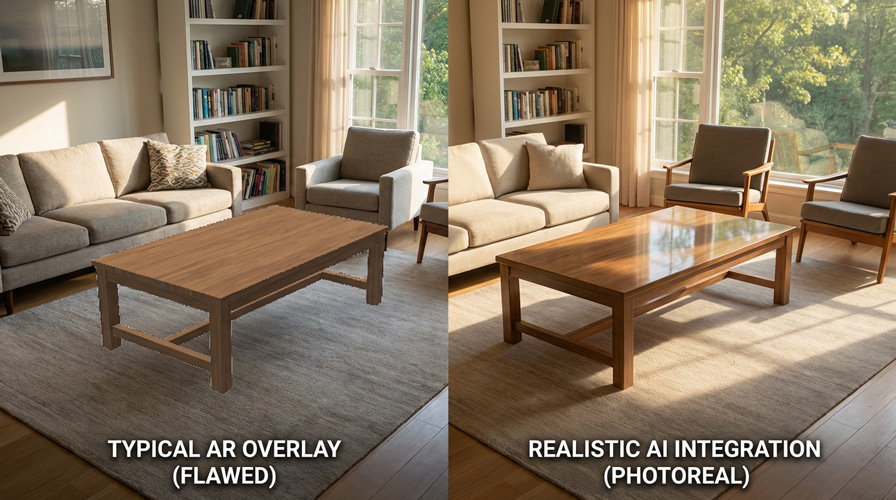
The biggest frustration with AR is the lack of realism. While the scale may be accurate, the visual quality often fails to convince the user that the piece truly belongs in the room.
Lighting & Shadows
Real-time lighting is computationally difficult. Most AR renders lack realistic shadows, making the furniture look like it's "floating" above the floor.
Materials & Texture
Fabric, wood grain, and metal finishes rarely react convincingly to your home's unique lighting conditions, leading to color and texture inaccuracies.
Occlusion & Context
AR often struggles to correctly place the furniture behind existing objects (occlusion) or integrate it with the room's existing style and color palette.
Common AR Furniture Preview Problems
- Floating furniture (poor shadows or grounding)
- Color shifts due to phone camera auto-exposure
- Unrealistic material reflections
- Poor integration with existing decor
Realistic Visualization Explained (The DecorViz Approach)
Realistic visualization, like the technology used by DecorViz, focuses on solving the realism problem. It starts with a photo of your actual space and uses advanced AI to seamlessly integrate the furniture into that image, matching the room's lighting, shadows, and color context.
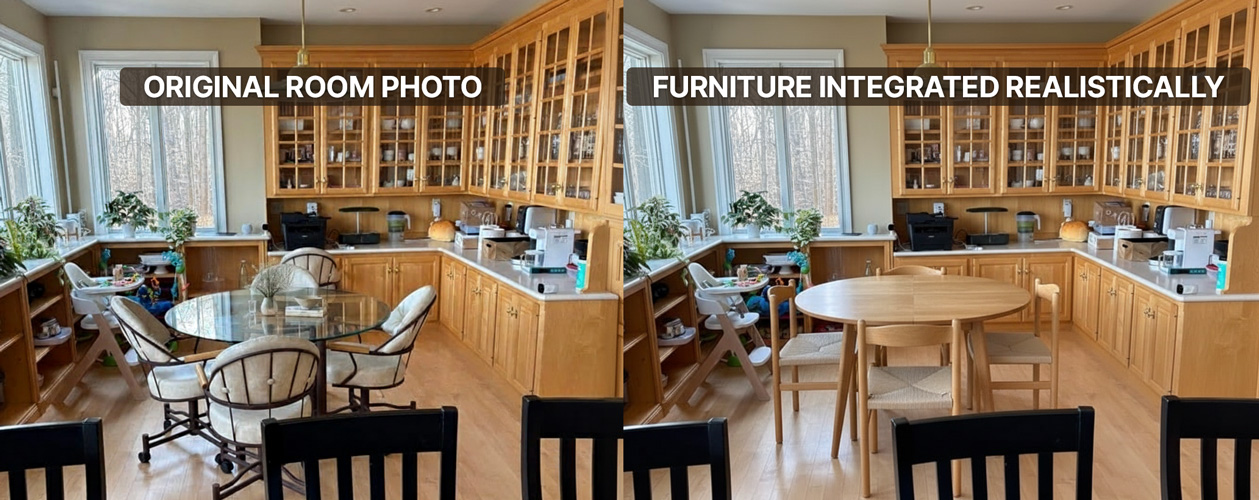
The goal isn't a real-time demo; it's a high-quality, believable preview that gives you decision clarity.
Comparison Table: AR vs. Realistic Visualization
Use this table to quickly determine which tool is best for your current stage of the furniture buying process.
When to Use Each Tool
The best strategy is often to use both tools at different stages of your decision process.
Use AR When...
You are checking rough fit, distance from walls, or general walkway clearance. It's a great tool for the initial "will it physically fit?" question.
Use Realistic Visualization When...
You are down to 2-3 final options and the risk is style regret (color, harmony, vibe). It answers the crucial question: "Does this piece belong in my home?"
Ready to confirm the feel?
Preview the piece in your room, then compare 2–3 options to see what looks natural and remove all doubt before buying.
Related resources:
• How to visualize furniture
in your room
• Why furniture looks
different at home
FAQ
Are AR furniture apps accurate?
They can be accurate for placement and rough sizing, but the visual accuracy (lighting, color, texture) is often poor, which is the main cause of purchase regret.
Can realistic visualization replace AR?
Not fully. AR is helpful for layout and fit. Realistic visualization is better for style and harmony decisions. They are complementary tools.
What should I use before buying?
Use AR to check fit first, then a realistic preview (like DecorViz) to confirm it looks natural in your space. This two-step process minimizes risk.
Most furniture regret doesn't come from poor measurements. It comes from uncertainty about how it will look in a real room.