Comparison
DecorViz vs Pixa (Pixelcut): Which Is Better for Furniture Previews? (2026)
TLDR
Pixa, formerly Pixelcut, is built for creating and editing production-ready visuals. DecorViz is built for seeing how the exact furniture product will look in your actual room before you buy it. If you need background removal, product showcases, batch edits, or brand creative, Pixa is a better fit. If you need to decide whether a sofa, rug, lamp, bed, or table belongs in your room, DecorViz is the more direct tool.
Quick summary
DecorViz wins
Exact product-in-room visualization, room-photo context, existing furniture replacement, and cross-retailer product comparison before checkout.
Tied
Both use AI image workflows, both run on web, and both can support people working with product images.
Pixa wins
Background removal, upscaling, retouching, product showcases, generated marketing visuals, video workflows, and batch creative work.
DecorViz vs Pixa: full comparison
Grouped by what actually matters for a furniture buying decision.
| Feature | DecorViz | Pixa (formerly Pixelcut) |
|---|---|---|
| Input and workflow | ||
| Starts from a room photo | Yes | Not as the core product workflow |
| Uses the real retailer product image | Yes | Yes for product image editing and creative workflows |
| Primary input | Room photo plus product image from any retailer | Prompt, image, video, product photo, or batch creative assets |
| Text-prompt creative control | Yes. Describe placement in natural language | Yes. Pixa describes prompt-driven creative workflows |
| Requires app download | No. Works in browser | No for web use. Mobile apps are also available |
| Output type | ||
| Shows one specific product in your actual room | Yes | No. Built for broader creative and product photo outputs |
| Exact product rendered into the room photo | Yes | No room-photo furniture placement workflow documented as the primary use case |
| Creates studio-style product imagery | No. Built for in-room preview | Yes. Product Showcase creates studio-grade imagery with a prompt |
| Background removal | No | Yes |
| Upscaling and retouching | No | Yes |
| Batch editing | No | Yes. Pixa describes batch edits across hundreds of files |
| Replaces existing furniture in the target spot | Yes | No exact room replacement workflow for a specific buyer room |
| Works on outdoor spaces | Yes. Patios, decks, gardens, terraces | Useful for creative outputs, not a dedicated outdoor furniture-in-room preview flow |
| Decision workflow | ||
| Best question it answers | Should I buy this exact product? | How do I create or improve production-ready visuals? |
| Side-by-side comparison of real products in the same room | Yes | No exact room-comparison workflow |
| Saved output you can revisit | Saved room preview of the exact item | Saved creative or edited image output |
| Useful for e-commerce sellers | Useful for furniture sellers and visualizers | Yes. Strong for product images, ads, and batch creative work |
| Useful for furniture shoppers | Yes. Built around the shopper room | Indirectly, if you only need product image editing |
| Retailer coverage | ||
| IKEA catalog | Yes | Can edit product images, but not a buyer room preview workflow |
| Wayfair | Yes | Can edit product images, but not a buyer room preview workflow |
| Amazon | Yes | Can edit product images, but not a buyer room preview workflow |
| West Elm | Yes | Can edit product images, but not a buyer room preview workflow |
| Target | Yes | Can edit product images, but not a buyer room preview workflow |
| Any independent retailer with a product image | Yes | Can edit product images, but not a buyer room preview workflow |
| Access | ||
| Browser access | Yes | Yes |
| Mobile app | No dedicated app required | Yes. iOS and Android apps available |
| Free way to start | Yes | Yes. Pixa says it offers a free version with basic editing tools |
Pixa column based on the official Pixa homepage, Pixelcut is now Pixa rebrand page, and Pixa pricing FAQ. DecorViz column based on the live product at decorviz.ai and its documented capability set. Last checked: April 13, 2026.
What the output difference looks like
The distinction is less about AI quality and more about the job you need done.
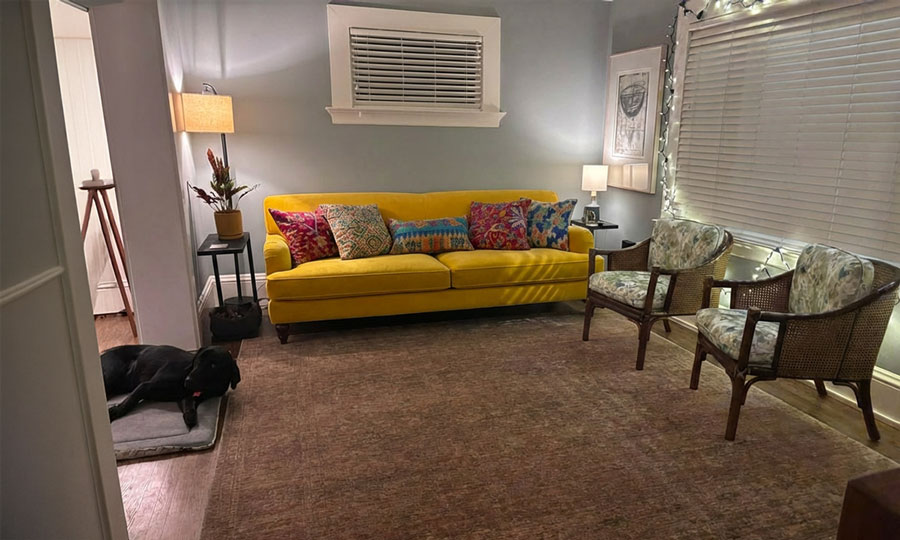
DecorViz output: the exact retailer product is rendered into the actual room from a room photo. The result is meant to answer a buying question about that one item.

Pixa is stronger for product creative work: backgrounds, retouching, product showcases, batch edits, and marketing visuals. Those are valuable, but they do not replace a buyer-room preview when the question is whether a product fits your home.
Pixa source: Pixelcut Google Play developer page. This image illustrates Pixa and Pixelcut app context.
Who should choose what
Choose DecorViz if
- You already found a furniture product and want to see it in your actual room.
- You want to compare multiple retailer products against the same room photo.
- You want your existing furniture replaced instead of editing a product image on its own.
- You are buying for a real space, not making a studio product marketing image.
Choose Pixa if
- You need product photo editing, background removal, upscaling, or retouching.
- You want studio-grade product showcase imagery generated from prompts.
- You need batch editing across many files.
- You are producing ads, brand visuals, videos, or general creative assets.
DecorViz is an independent tool and is not affiliated with Pixa or Pixelcut.
Product creative tools vs product-in-room tools
Pixa sits in the AI creative workspace category. It helps creators and businesses generate, edit, and ship visuals, including product showcases, background work, upscaling, retouching, shadows, batch edits, and videos.
DecorViz sits in the furniture purchase-preview category. It starts with a room photo and a real product image, then shows how that exact item looks in the buyer's actual space. Both tools can touch product images, but they answer different questions.
Frequently Asked Questions
Yes, for exact furniture-in-room previews. Pixa, formerly Pixelcut, is a broad AI creative and product photo editing platform. DecorViz is built specifically to place a real product image into your actual room photo before you buy.
Pixa helps create and edit production-ready visuals, including product showcases, background removal, upscaling, retouching, shadows, and batch edits. DecorViz focuses on furniture shopping: upload a room photo and a product image to see that exact item in your room.
Yes. Pixa says Pixelcut has been renamed to Pixa with the same team, same product, and a new name for a broader creative workspace.
Pixa can be useful for creating product marketing images, changing backgrounds, removing backgrounds, adding shadows, and preparing e-commerce visuals. It is not primarily built to show a specific furniture item inside your own room photo before buying.
Yes, if your goal is furniture visualization. DecorViz is a good Pixa or Pixelcut alternative when you want to see the exact product in your actual room, compare retailer options, and make a purchase decision.
Yes. DecorViz works with any retailer product image, so you can compare products from IKEA, Wayfair, Amazon, West Elm, Target, and independent stores in the same room photo.
Yes. Pixa describes Product Showcase as a workflow for creating studio-grade product imagery generated with a prompt. That is useful for marketing visuals, but it is different from seeing a furniture item in your own room before checkout.
No. DecorViz runs in your browser. Upload a room photo and a product image and you can visualize the exact product in your room without installing anything.
No. DecorViz is an independent visualization tool and is not affiliated with, sponsored by, or endorsed by Pixa or Pixelcut.
Choose Pixa if you need a general creative workspace for product photography, background edits, AI image generation, video workflows, batch editing, or brand content. Choose DecorViz if you want to see a real furniture product in your actual room before buying.
Other DecorViz comparisons
See the exact product in your actual room.
Upload your room photo and the product image. See how that exact item looks in your real room before you order.
Try DecorViz freeNo product-photo-only workflow. No studio scene guesswork. No generic background swap.