Comparison
DecorViz vs DressMyCrib: Which Gives You a Better Furniture Preview? (2026)
TLDR
DressMyCrib is built for a quick live AR preview through your phone camera. DecorViz is built for seeing how the exact product will actually look in your space from a room photo. It uses the real product image, can replace existing furniture, and produces a result you can review and compare later. If you need a DressMyCrib alternative for realistic furniture previews, DecorViz is better than DressMyCrib for accurate room visualization around a buying decision.
Quick summary
DecorViz wins
Exact product visualization, existing furniture replacement, stronger scene-aware rendering, and side-by-side product comparison against one fixed room photo.
Tied
Both work with any retailer product image you upload, both run in the browser with no app download, and both offer a free way to try the experience.
DressMyCrib wins
Fast live AR check through your phone camera when you are physically standing in the space and a rough real-time overlay is all you need.
DecorViz vs DressMyCrib: full comparison
Grouped by what actually matters for a furniture buying decision.
| Feature | DecorViz | DressMyCrib |
|---|---|---|
| Input and workflow | ||
| Starts from a room photo | Yes | No. Requires a live camera view of the room |
| Needs you physically in the room | No | Yes. Requires the phone camera in the space |
| Requires app download | No. Works in browser | No. Web AR in browser |
| Uses the real retailer product image | Yes | Yes. User-uploaded furniture image |
| Text-prompt spatial placement | Yes. Describe placement in natural language | No |
| Output realism | ||
| Rendering approach | AI scene analysis with scene-aware lighting | 2.5D AR overlay, per DressMyCrib's own blog |
| Lighting matched to the room scene | Yes. Photometric scene analysis | AR-rendered lighting in the live camera view, depends on the AR session |
| Scene-consistent shadow synthesis | Yes. Shadows derived from scene lighting | AR-rendered shadows in the live camera view, realism depends on the AR session |
| Perspective and depth inference | AI-inferred from a single photo | Relies on phone sensors in a live camera view |
| Mirror and reflective surface rendering | Yes. Two-pass reflective rendering | No |
| Works on outdoor spaces | Yes. Patios, decks, gardens, terraces | Built around indoor live AR detection |
| Replaces existing furniture in the target spot | Yes | No. Overlays the new piece on top of the live camera view |
| Output format | Exact product rendered into a room photo | Live AR view on camera, with capture available |
| Decision workflow | ||
| Available after the live session ends | Yes | Only if you manually capture the AR view as an image or video |
| Side-by-side comparison against the same room | Yes | No. Harder to line up multiple options in a live AR workflow |
| Reviewable on any device | Yes | Captured image or video can be reviewed; the live AR placement itself requires the phone session |
| Shareable with another person | Yes. Image link | Yes, by capturing the AR setting as an image or video |
| Works when you are away from home | Yes, from a room photo | No. Requires live camera in the room |
| Best question it answers | Should I buy this exact product? | How does this item look in live AR right now? |
| Retailer coverage | ||
| IKEA catalog | Yes | Yes, via uploaded product image |
| Wayfair | Yes | Yes, via uploaded product image |
| Amazon | Yes | Yes, via uploaded product image |
| West Elm | Yes | Yes, via uploaded product image |
| Target | Yes | Yes, via uploaded product image |
| Any independent retailer with a product image | Yes | Yes, via uploaded product image |
| Access | ||
| Browser access | Yes | Yes. Web AR |
| App download required | No | No |
| Free tier | Yes | Yes |
DressMyCrib column based on its official Furniture Visualizer page and the DressMyCrib blog article How to Visualize Furniture in a Room by Marija Liatukaite, published Nov 14, 2025. DecorViz column based on the live product at decorviz.ai and its documented capability set. Last checked: April 11, 2026.
What the output difference looks like
The workflow difference becomes clearer when you compare the output side by side.
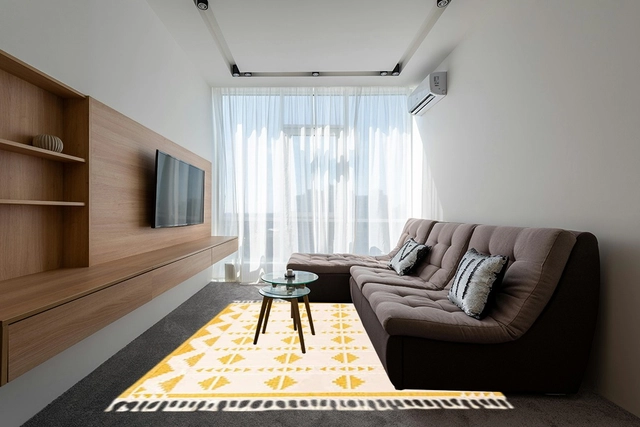
AR overlay: the furniture image is shown live through the phone camera. Useful for rough placement in the moment, but it does not replace the existing furniture in the scene and is harder to inspect carefully later.
Image source: DressMyCrib.
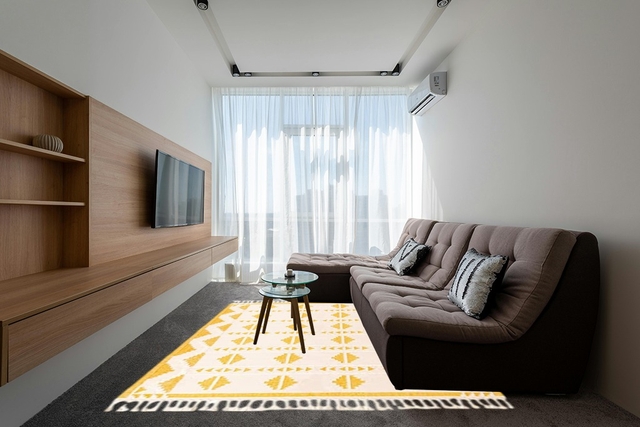
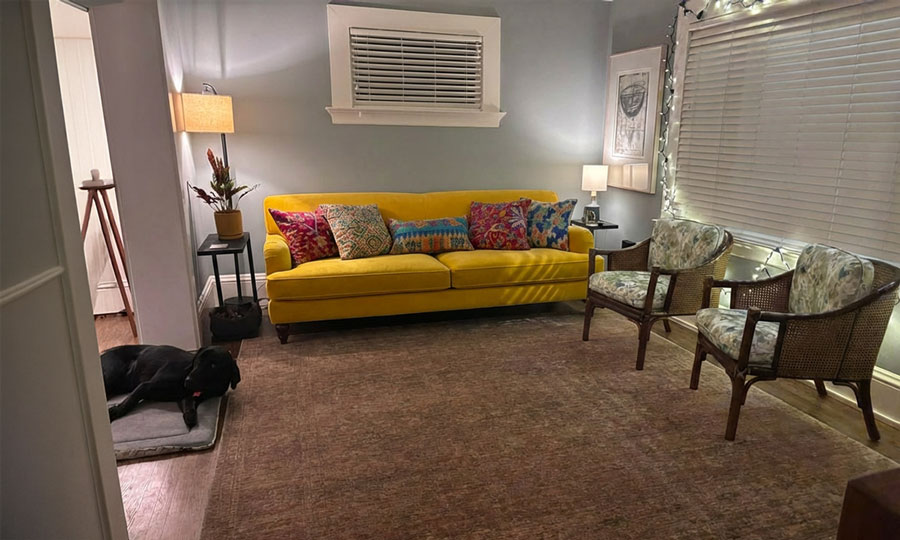
DecorViz view: the exact product is rendered into the actual room from a room photo. Existing furniture is replaced, so the item you are considering is the thing being judged, with a much more realistic context for the decision.
Who should choose what
Choose DecorViz if
- You want realistic visualization of the exact product in your actual room.
- You want your existing furniture replaced instead of covered by an AR overlay.
- You want to compare several retailer options against one fixed room photo.
- You are not always in the room when you want to decide.
Choose DressMyCrib if
- You are physically in the room and a quick live AR overlay is enough.
- You want the fastest possible check without setting up a room photo first.
- You do not need existing furniture replaced or a revisitable comparison workflow.
- You are browsing casually rather than making a final purchase decision.
DecorViz is an independent tool and is not affiliated with DressMyCrib.
AR overlay vs realistic rendering comparison
DressMyCrib sits in the live AR category. You point your phone at the room, and a furniture image is overlaid on the live camera view. It is a fast way to get a rough sense of placement while you are standing in the space.
DecorViz sits in the room-photo product preview category. You upload a room photo once, then upload the real product image, and get a realistic preview of that exact item in your actual room. You can revisit the result later, compare it against other products, and share it with another person. Those are two different jobs. If the job you need done is "decide whether to buy this specific product," a realistic product-in-room result is easier to reason about than a live AR overlay.
Frequently Asked Questions
For most real purchase decisions, yes. DressMyCrib is a phone-camera AR tool that overlays a furniture image into a live camera view. DecorViz works from a room photo and a real product image, can replace existing furniture, and produces a realistic product-in-room result you can review and compare before ordering.
DressMyCrib focuses on live AR preview through your phone camera after you upload a furniture image. DecorViz works from a room photo and the real product image to create a realistic product-in-room preview you can revisit later and share with another person.
Yes. DressMyCrib lets you upload your own furniture image, including images from sources such as Amazon or Pinterest, and preview them in live AR on your phone.
No. DressMyCrib's main furniture workflow is a live phone-camera AR preview. You can capture the AR view as an image, but the core experience is a live overlay, not a generated realistic room-photo composite. DecorViz produces a room-photo result that you can review, compare, and share before ordering.
Yes. DecorViz is a strong DressMyCrib alternative if you want a room-photo product preview workflow rather than a live AR workflow. It works with any retailer product image and gives you a realistic preview you can compare and revisit before spending.
Yes. When you place a new sofa, bed, or rug in a room that already has one, DecorViz replaces the old piece with the new product in the generated image. DressMyCrib overlays the new piece on top of the live camera view, so your existing furniture stays visible underneath.
Yes. DecorViz handles patios, decks, gardens, and outdoor entertaining areas. It also renders products correctly in scenes that contain mirrors and reflective surfaces, using a two-pass rendering approach. DressMyCrib is built around indoor live AR preview through the phone camera.
DecorViz is better if you want a realistic preview built from your room photo and the exact product image. DressMyCrib is better if you want a quick browser-based AR check using your phone camera while you are physically standing in the room.
No. DecorViz runs in your browser. Upload a room photo and a product image and you can visualize the exact product in your room without installing anything.
No. DecorViz is an independent visualization tool and is not affiliated with, sponsored by, or endorsed by DressMyCrib.
Choose DressMyCrib if you are physically in the room with your phone and want a quick live AR overlay of a furniture image. Choose DecorViz if you want realistic product-in-room visualization, existing furniture replacement, or the ability to compare multiple products against the same room photo before buying.
Other DecorViz comparisons
See the exact product in your actual room.
Upload your room photo and the product image. See how that exact item looks in your real room before you order.
Try DecorViz freeNo app. No live AR scanning. No guesswork.